
Official component that allows VST effects to be used as DSPs in foobar2000.
www.foobar2000.org/components/view/foo_dsp_vst3
hydrogenaud.io/index.php/topic,123342.0
Category Archives: Freeware

swyh-rs ~ Stream What You Hear
A “Stream-What-You-Hear” implementation written in Rust, MIT licensed. swyh-rs implements the idea behind the original SWYH but written in Rust. It allows you to stream the music you’re currently playing on your PC (Windows or Linux) to an UPNP/DLNA/OpenHome compatible music player (a “Renderer”).
github.com/dheijl/swyh-rs
Share this:

foo_jscript_panel3 ~ JScript Panel 3
This component for foobar2000 is based on WSH Panel Mod.
It allows the creation of customisable panels that can be written with
JavaScriptrather than theC++required by the foobar2000 SDK.Under the hood, it uses
Windows Script Host. Because of this, JS language support is limited toECMAScript 5. Nothing newer will ever be supported.Here are just some of the features provided by the component…
- Custom drawing of text, external images, lines, rectangles, etc.
- Use fonts/colours from the main preferences of whichever user interface you are using.
- Executing main/context menu commands.
- Ability to create custom buttons/menus.
- Capture keystrokes/mouse movement/clicks.
- Callbacks can be used to trigger code based on foobar2000 events.
- Read/write file tags.
- Complete manipulation of playlists.
- Media Library display/sorting/filtering
- Save settings on a per panel basis. These persist between restarts and are stored inside the layout configuration file for whichever UI your are using. You can also write your own functions to load/save settings from
JSONor plain text files.- Built in support for making
GET / POSTrequests which return plain text and there is also a method for downloading binary files. If you prefer, you can use theMicrosoft.XMLHTTPActiveXobject.- There are many built in methods for working with the local filesystem, launching external applications etc. Previous versions / other scripting components rely on
ActiveXobjects but the need for those is greatly reduced.- And much more…
Share this:

foo_jscript_panel by leefan
This was a customisable panel for the foobar2000 audio player. It was based on WSH Panel Mod and was its successor. It is no longer maintained and has been superseded.
All scripts were written in Javascript but the component provided means to do the following:
github.com/leefan/foo-jscript-panel
- Custom drawing of text, images, lines, rectangles, etc.
- Executing main/context menu commands.
- Ability to create custom buttons/menus.
- Callbacks can be used to trigger code based on foobar2000 events . See callbacks.txt.
- Read/write file tags.
- Complete manipulation of playlists.
- Media Library display/sorting/filtering
- And much more…
Share this:

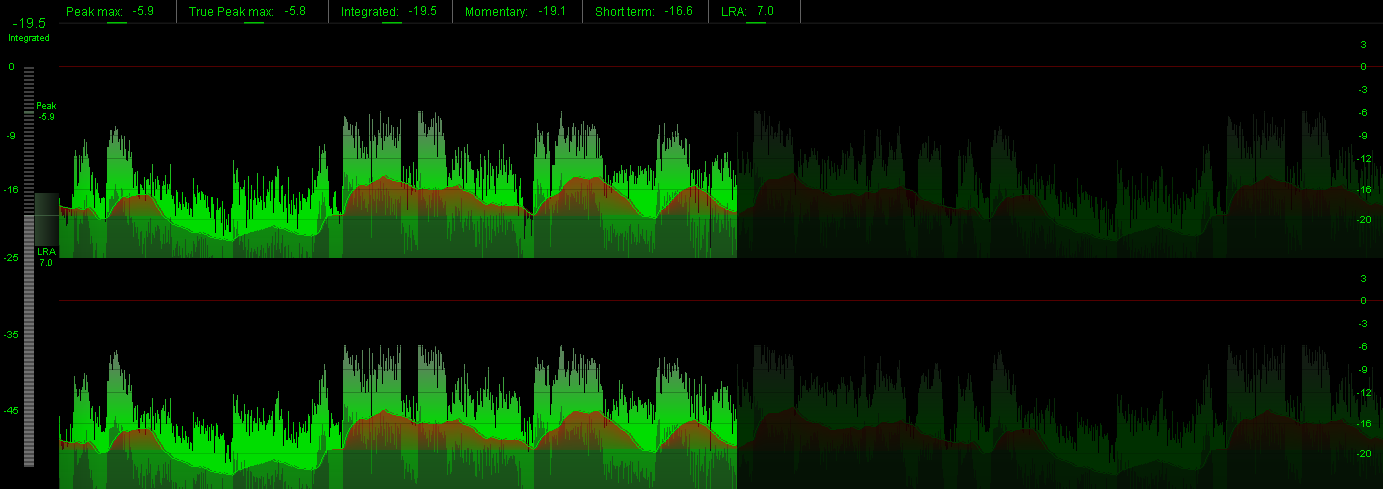
foo_loudness_peakmeter ~ Measure & Visualise Loudness & Sample Peaks

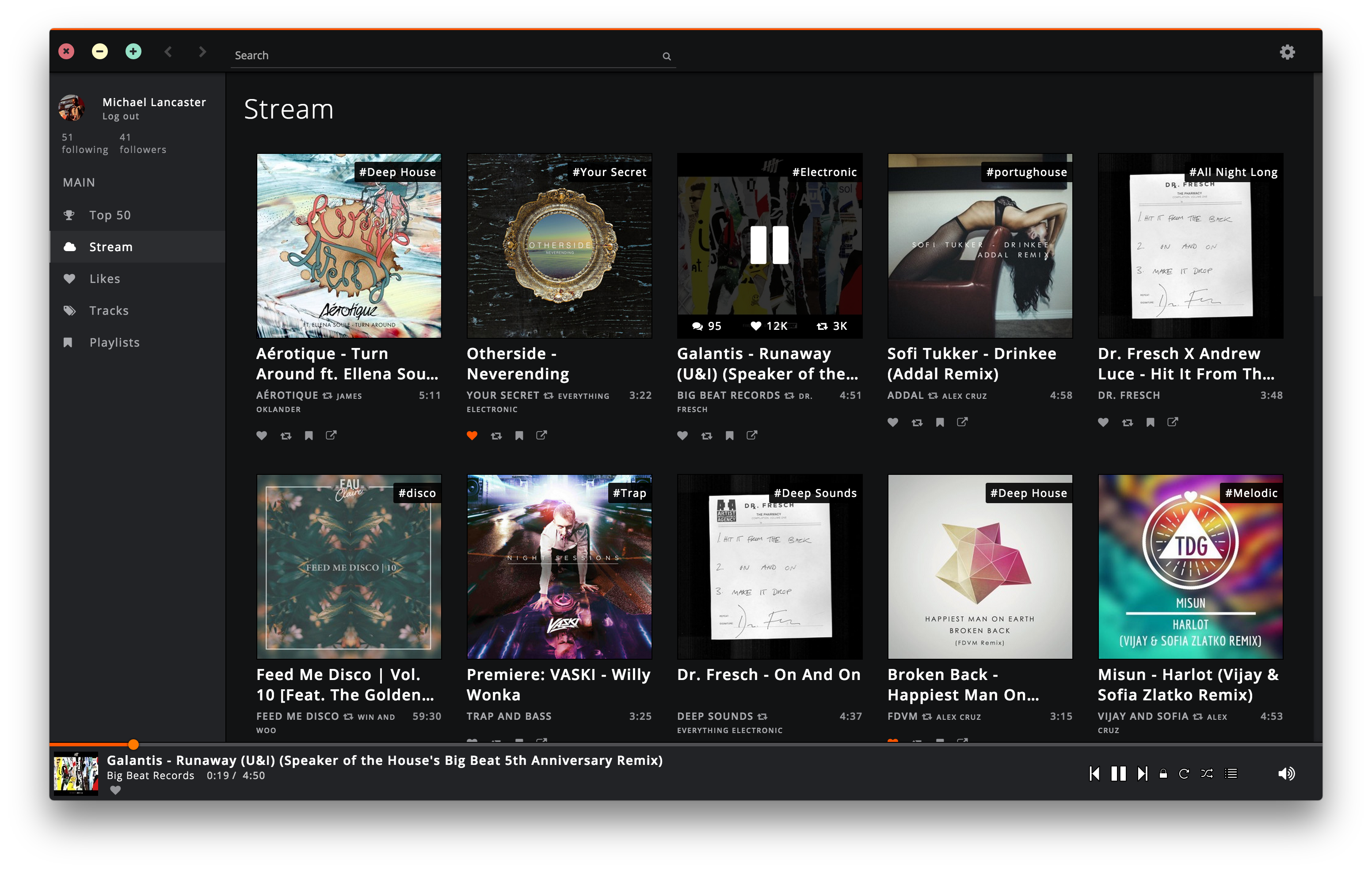
Soundnode ~ SoundCloud For The Desktop
Soundnode App is an Open-Source project to support Soundcloud for desktop Mac, Windows, and Linux. It’s built with Electron, Node.js, Angular.js, and uses the Soundcloud API.
soundnode.github.io/soundnode-website
Share this:

GVolWheel ~ Linux Volume Control
GVolWheel is a Linux application which lets you control the volume easily through a tray icon you can scroll on. Easily integrate with minimal desktops (Openbox,IceWM,XFCE etc).
github.com/Junker/gvolwheel
Share this:

eyeD3 ~ ID3 Python Script Development
eyeD3 is a Python tool for working with audio files, specifically MP3 files containing ID3 metadata (i.e. song info).
It provides a command-line tool (
eyed3.readthedocs.io/en/latest/indexeyeD3) and a Python library (import eyed3) that can be used to write your own applications or plugins that are callable from the command-line tool.
Share this:

rmlyrics3 ~ Lyrics3 Tag Remover For mp3s
Before ID3v2 came around, Lyrics3 and Lyrics3v2 had their uses (extending the 30-char limit, placing synced lyrics), but nowadays they are a nuisance for most of us. Plus, we have the lyrics frames
USLTandSYLTin ID3v2.Lyrics3 tags come between the audio data and an ID3v1/ID3v1.1 tag at the end of the file (sometimes without the following ID3v1 tag, even if that is mandatory according to Lyrics3 specs). Current ffmpeg and some players and tools still have bugs and try to interpret Lyrics3 tags as audio data, resulting in obscure errors. Unfortunately, there are almost no tools out there to remove Lyrics3 tags—most programs ignore them, but write them back if changing tags. When removing ID3v1 tags from a file, this can result in the illegal situation mentioned above (having a Lyrics3 tag without a following ID3v1 tag)..
This code has been tested with thousands of files but I can give no guarantees. If you destroy your whole music collection, it’s not my fault. Please have a backup!
github.com/Moonbase59/rmlyrics3
Share this:

mp3view ~ Linux Perl Script
Unlike a lot of people, I strangely like to have my individual non-mixed tracks located in one flat folder and any mixes (such as Ministry Of Sound mix albums, etc…) go into another folder sorted by Albums in separate folders. I also embed all of my MP3s with the album art from the album it is from so they are fully portable across a multi-tude of systems.
Therefore, I want my original system kept as is for me, but software like Windows Media Center annoyingly requires you to have it structured in the ‘Album Artist -> Album’ directory structure with the album art stored as ‘Folder.jpg’.
I will not be ranting about how rubbish that required structure is on a technical level; I have got over that now :). But instead, I wrote a PERL script that runs on my Linux NAS that does the following:
www.flumps.org/mp3z/tagging
- Only runs on Linux – if anyone wants to code link support in for Windows / NTFS partitions, please go ahead and mail back the changes.
- Scans a directory (–mp3dir) (recursion is optional using –recursive) for MP3s / M3U playlists and creates softlinks pointing back to the original files under the ‘Album Artist\Album’ folder structure within –linksdir.
- The embedded album art is then checked across the album being processed to ensure it is the same – if not, a Warning is output leaving you to fix it. The embedded album art is created as ‘Folder.jpg’ for Windows Media Center.
- If you want it to delete soft links for tracks / directories that no longer exist in –linksdir (i.e. if you have moved / renamed the original file), you can use –delnonexists.
- On the off chance you want the –linksdir within the directory structure of –mp3dir, you can use –excludemp3dir to ensure the –linksdir isn’t double scanned.
- For the first run, I strongly recommend not using the –createlinks switch so you can view any errors you may get.
- You need to have the library MP3::Tag installed for this to run – you can get this from CPAN.
Share this:

tone ~ Audio File Tagger & Metadata Editor
toneis a cross platform audio tagger and metadata editor to dump and modify metadata for a wide variety of formats, includingmp3,m4b,flacand more. It has no dependencies and can be downloaded as single binary for Windows, macOS, Linux and other common platforms.The code is written in pure
C#and utilizes the awesome atldotnet library to provide full support for a wide variety of audio and metadata formats.Features:
The main purpose of
toneis to tagm4baudio books for myself. It is planned as a successor to [m4b-tool].github.com/sandreas/tone
dumpmetadata of audio files
- different metadata formats (e.g.
chptfmtnative,ffmetadata, etc.)- file information (bitrate, channels, duration, etc.)
- support for filterable
jsonoutput (similar tojq)- extensive list of supported tags (default fields like album or *artist as well as custom fields, covers, chapters, etc.)
tagaudio files with different kinds of metadata
- different file formats (e.g.
mp3,m4b, andflac)- extensive list of supported tags (default fields like album or *artist as well as custom fields, covers, chapters, etc.)
- filename to tags via
--path-pattern(see below)- custom javascript taggers via
--scriptand--script-tagger-parameter
Share this:

metamp3 ~ mp3 Command Line Utility
I wrote this because I wanted a command line tool that could
add album art to (and save from) mp3 files, compute replaygain
and save them as ID3 tags (readable by Winamp, etc).Features:
- Write (all) Text, URL and Picture frame tags, with description.
- Compute replay-gain values and set them as ID3v2.3 tags.
- Apply and Undo volume gain (as mp3gain).
- Extract pictures from mp3 files.
- Inspect ID3 v1.1, v2.3, and v2.4 tags.
- Inspect detailed info on mp3 files, including lametag data.
hydrogenaud.io/index.php/topic,49751.0
www.flumps.org/mp3z/tagging/metamp3.exe

 The Audio File