Manifold ~ Audio Batch Processing Tool


Manifold is a desktop audio batch-processing tool built for inspecting, transforming, and exporting large collections of audio files with a visual workflow editor. Useful for checking and pre-processing audio for game-audio production, podcasts and broadcast, it is designed to make repetitive tasks more efficient and reproducible.

It combines a polished ImGui-based interface with a custom node-based audio pipeline, allowing you to build repeatable processing chains for tasks such as loudness normalization, peak limiting, DC offset cleanup, resampling, and format conversion.Why Manifold?

Manifold was designed to make audio batch work feel more structured and reproducible. Instead of manually running ad-hoc commands or scripting every step, you can:

  • import whole folders of audio files,
  • inspect their metadata and analysis results,
  • create reusable processing chains,
  • export processed files with consistent naming and format settings.

This makes it useful for workflows such as podcast preparation, mastering prep, broadcast delivery, and game-audio asset processing.

Key Features:

  • Batch import of files and folders
  • Drag-and-drop support from the file explorer
  • Built-in audio playback for quick previews
  • File table with metadata and analysis metrics
  • Configurable processing workflows using nodes
  • Output settings for folder, naming, format, and subtype
  • Background processing with task history and logs
  • Parallel analysis for loudness and DC offset metrics

Supported Processing Nodes:

Manifold includes a growing set of audio processing and analysis nodes, including:

  • Loudness analysis
  • Loudness normalization
  • True peak limiting
  • DC offset removal
  • Peak normalization
  • Channel mixing
  • Silence trimming
  • Fade in/out
  • Loudness compliance checks
  • Clipping detection
  • Dynamic range analysis

These nodes can be chained together to create custom pipelines for different production scenarios.

github.com/AnClark/Manifold

Winamp ASIO ~ ASIO & SRD Resampler


Further development of the ASIO output module by otachan (2006) for the Winamp player, including:

  • problem with setting the sample rate fixed
  • gapless mode completed
  • added individual channel assignment
  • added upsampling to a non-fractional multiple of base-frequency
  • added high quality resampler: sample rate doubler for best audio playback

winamp-asio-plugin.sourceforge.io
sourceforge.net/projects/winamp-asio-plugin
forums.winamp.com/forum/winamp/winamp-technical-support/4647216-asio-output-plugin

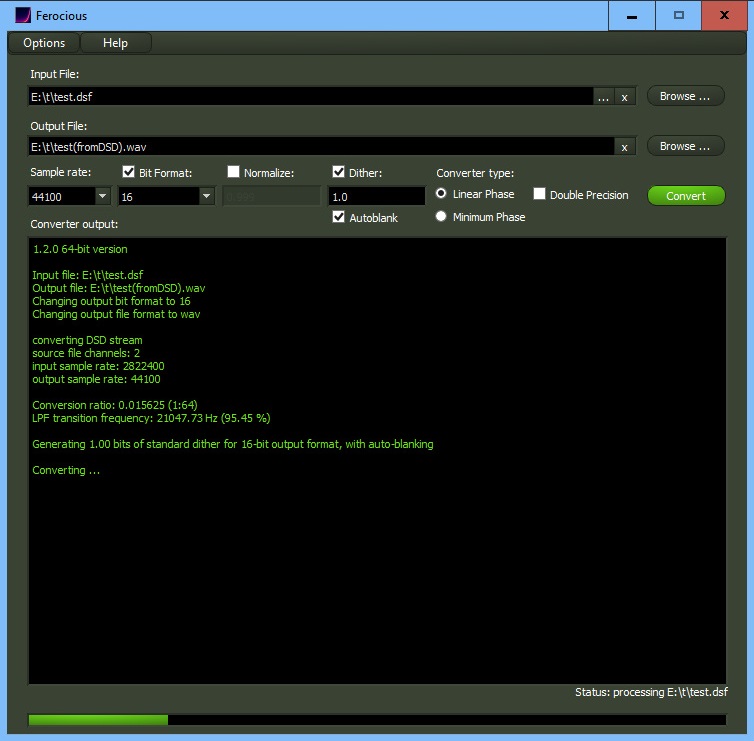
Ferocious File Converter ~ Graphical Frontend For ReSampler


Ferocious File Converter is a graphical front-end for ReSampler, and potentially any number of other command-line audio conversion tools.

It provides a convenient and easy-to-use method for converting audio files between a number of formats.

github.com/jniemann66/ferocious

microenc ~ Linux/BSD Batch Encoding Script


microenc is a small Bash shell script for Linux/BSD for encoding directories with audio files to other formats using FFmpeg as encoder.

Features:

  • Encodes to MP3, AAC, Vorbis, Opus, AC-3, E-AC-3, DTS, FLAC, ALAC, WavPack, AIFF and WAV audio
  • Auto-copying of metadata and, for MP3/AAC/FLAC/ALAC/AIFF, cover art
  • Optional high-quality audio resampling
  • Requires only ffmpeg and ffprobe
sourceforge.net/projects/microenc

ReSampler ~ Command Line Audio Conversion


ReSampler is a high-performance command-line audio sample rate conversion tool which can convert audio file formats with a variety of different bit-depths and audio channel configurations. ReSampler compiles and runs on Windows, Linux and macOS

github.com/jniemann66/ReSampler

PGGB•IT! Batch Resampling ~ Crippleware Folder Resampler


PGGB•IT! is a Windows application for PGGB batch resampling of album folders using the Windows Explorer library as a queue. The companion FOLDER-DROP! allows folders to be included in the library using Explorer’s drag-drop. Generate resampled tracks (in FLAC, WAV or WV format) for use in a compatible music player. PGGB•IT! has a comprehensive settings panel and visually rich console output. Use the standard PGGB Offline (MATLAB) or use PGGB-RT (Intel IPP/AVX) to accelerate resampling to only a minute per average track. A free license of PGGB-RT has no feature limits at up to 2 Million Taps. A full functionality license gets you up to 1 Billion Taps.

download link works, licensing link does not

foo_pggb_rt ~ Foobar2000 Realtime Resampler


foo-RT – A PGGB-RT foobar2000 (Windows) component up samples or down samples your audio tracks in near real-time fashion using insanely long linear filters. We are able to do this by using hardware acceleration PGGB-RT SDK. We say ‘near real-time’ because remastering using insanely long filters require a finite time. Depending on the length of your track and the filter length (in millions of taps) you choose, the very first track will take anywhere from a few seconds to a few ten seconds to start. The subsequent tracks would play in a gap-less fashion

www.remastero.com/foo-pggb-rt-guide
www.foobar2000.org/components/view/foo_pggb_rt