
Adding an analog VU meter to the Foobar2000 2.x Default User Interface
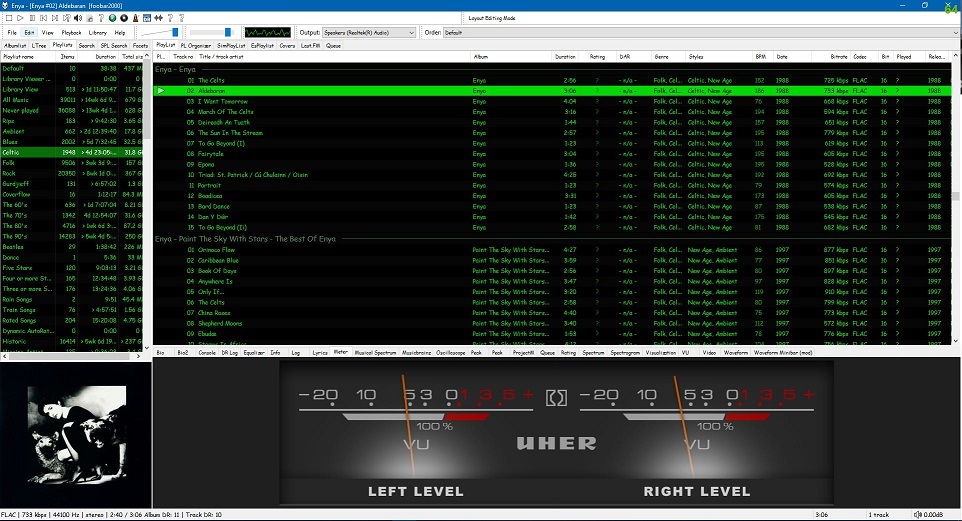
Required component: foo_vis_vumeter
Directions:
- Download foo_vis_vumeter
- Click on foo_vis_vumeter which should install the component
- Click
Applyand thenOkto restart Foobar - Copy some .bin skin files to the …\AppData\Roaming\foobar2000-v2\vumeter folder (Shift+File>Browse configuration folder)
- Select
View > Layout > Enable layout editing mode - Right click the tab area in a panel and select
Add New Tab - Right click the new tab and rename it “Analog VU Meter” or whatever
- Right click the new tab display area and select
Add New UI Element - Select ‘
Analog VU Meter(DirectX 12)’ from the list (Playback Visualization) - Disable layout editing mode
Parameters:
Right mouse click on the meter display:
- submenus – Layout / Mode / Levels / Decay / Tuning / Options
- Fullscreen
- Skin Selection
Mouse wheel (hover over meters)
- Adjusts current Tuning selection


Hi
How do i get more needle movement in the VU Meters?
LikeLike
Right click on meter, select “Tuning”
LikeLike
I have installed the .bin files / VU meters into the vumeters file folder. NONE of the instructions online still allow me to install the VU meter. I am right clicking on the blank area that the new VU meters tab on the player provide me. It comes up with a box that has a bunch of options for Containers/DSP/Playback Information/Playback Visualization.
The Playback Visualization has two options for VU meters: VU Meter and VU Meter (Direct X 12).
How do I choose and install the VU Meters from this box or am I even in the right box?
LikeLike
I suspect you just need to select the component from the list.
LikeLike
Hi! I can’t find the option of skin selection with right click. And I don’t know how to change the vumeter without erasing the previous bin and change it for the new one.
LikeLike
Are you using the new version or the old?
LikeLike
On the latest version of Foobar2k, how do I actually install the .bin files after I install the DX12 file? I cannot find any information on what to do or how to import them. They’re downloaded and in my Components folder in my VU Meters folder.
LikeLike
Copy .bin skin files to the …\AppData\Roaming\foobar2000-v2\vumeter folder (Shift+File>Browse configuration folder)
LikeLike
anyone know how to get it working with foobar 2.0?
LikeLike
This now works with the 2.x 32bit version.
LikeLike
Thank you for the update. Tried the links you shared but same result. ‘Access Denied’ . If you need screen grabs of the issue let me know.
LikeLike
Hi, I’ve fixed all the links so please try them again and let me know if you find any that aren’t working. Thanks.
LikeLike
Kudos and Thanks.
Some of the skins mentioned in the gallery here https://audio-file.org/foobar2000-vu-meter-skins-gallery/ are not downloadable as they require google drive access with permission from the owner. Any ideas how to get them ?
LikeLike
Which ones?
LikeLike
Technics RS 671 by SanJose
SONY TC K80 by SanJose
Akai GX 620 by SanJose
LikeLike
Thanks, fixed
LikeLike
try
https://drive.google.com/file/d/0BxvGsS6WHzXudEV4YUlhVHhmSG8/view?usp=sharing
https://drive.google.com/file/d/0BxvGsS6WHzXuZ1VLMHZYTzY3am8/view?usp=sharing
http://drive.google.com/open?id=0BxvGsS6WHzXuaUV2QmM4cWoyU2M
LikeLike
Pingback: Kitten Player ~ YouTube Audio For Windows | The Audio File
To make it work correctly and change among the meter styles you have to put the .bin files in: C:\Program Files (x86)\foobar2000\components. Ciao
LikeLike
not correct as far as I know, what makes you say that?
LikeLike
Hello! im facing an issue,here is no folder for skin installing! i tried to put them on the user-component folder and i created a foo_vis_vumeter folder and put the files in and nothing! any clue?
LikeLike
Hi, is your install a permanent or portable installation of Foobar2000?
LikeLike
reinstall everything … restart Foobar? restart system?
LikeLike
Bonjour,
Je suis parvenu à déplacer les Vu-Mètres, étape suivante:
1 – redimensionner la fenêtre “vu-mètre”
2- placer les onglets au dessus de cette fenêtre
3- insertion des pochettes dans la fenêtre au dessus des vu-mètre
Merci beaucoup, bonne journée
Jluc
LikeLike
Bonjour,
Merci pour votre tuto, c’est super, deux questions :
1 – je n’ai récupere que le “Vu métre” par defaut, où récupérer ls fichiers “.bin” ?
2 – comment faites vous pour faire glisser les vu mètres au bas de la fenêtre ?
Meci de votre réponse
Jluc
LikeLiked by 1 person
.bin files ~ https://audio-file.org/foobar2000-vu-meter-skins-gallery/
2) repositioning is done in foobar’s “Layout” mode
LikeLike
Bonjour,
Merci beaucoup de votre réponse, je m’y penche.
JLuc
LikeLike
Bonjour,
Je suis parvenu à déplacer les Vu-Mètres , étape suivante :
1 – redimensionner la fenêtre “vu-mètre”
2- placer les onglets au dessus de cette fenêtre
3- insertion des pochettes dans la fenêtre au-dessus des vu-mètre
Merci beaucoup, bonne journée
LikeLike
Pingback: Foobar2000 ~ VU Meter Skins Gallery | The Audio File
Good Information… Thanks for sharing, mecoinst Dual Input Thermometers
LikeLiked by 1 person
Glad to help!
LikeLike
Do you know where I can find the application to make my own meter?
LikeLiked by 1 person
try starting here http://foobar2000.ru/forum/viewtopic.php?t=5023
LikeLike
Hello. When I right click on the VMU meters and then select “layout” there is no “skins” option. Everything else is there Left+ Right, Left Only, Right Only, Mono, etc, but no “skin”.
LikeLiked by 1 person
Hi, you will only see skins listed if the .bin files are properly installed in the AppData\Roaming\foobar2000\user-components\foo_vis_vumeter folder
LikeLike
Hi!, I am having the same problem. And the .bin files are in the “AppData\Roaming\foobar2000\user-components\foo_vis_vumeter folder”
LikeLike
Outstanding tutorial with all the relevant links that actually work, thanks. I updated my Fooobar to the latest version which messed up the VU plugin I already had. This article helped to reset everything and even let me use some new .BINs. Thanks again
LikeLiked by 1 person
You’re welcome. Hopefully I’ll get a chance to link to some more great VU meter skins soon. 🙂
LikeLike
how can I display two couple of vu meter with independent skin ?
Thanks
LikeLiked by 1 person
You’ll need to duplicate the second part of the install, from step 7 on, and add a second foobar panel or tab.
LikeLike
It worked pefectly, thank you very much for this guide
LikeLiked by 1 person
You are most welcome!
LikeLike
Hi,
Can you please share a link as to where can we download the skin as you use with green letters and grey frames. Thanks!
LikeLiked by 1 person
Hi, I’m not using a skin, what you see is the default user interface (DUI) with a custom configuration. https://tom2tec.wordpress.com/2015/10/31/current-foobar-interfaces-dui-default-user-interface/
LikeLike