FluentFlyout ~ Windows Audio Flyout


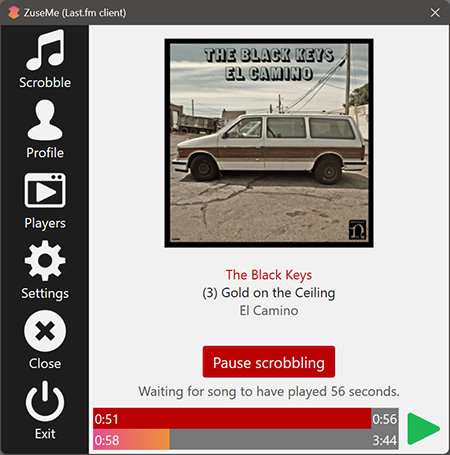
FluentFlyout is a simple and modern audio flyout for Windows, built with Fluent 2 Design principles. The UI seemingly blends in with Windows 10/11, providing you an uninterrupted, clean, and native-like experience when controlling your media.

FluentFlyout features smooth animations, blends with your system’s color themes, includes multiple layout positions and a suite of personalization settings while providing media controls and information in a nice and modern looking popup flyout.

Features:

  • Native Windows-like design
  • Uses Fluent 2 components
  • Utilises Windows Mica blur
  • Supports Light and Dark mode
  • Matches your device color theme
  • Smooth animations
  • Customizable flyout positions
  • Includes Repeat All, Repeat One and Shuffle
  • Listens to both volume and media inputs
  • Sits unobtrusively in system tray
  • Audio flyout: Displays Cover, Title, Artist and media controls
  • “Up Next” flyout: shows what’s next when a song ends
  • Lock Keys flyout: displays the status of lock keys at a glance

github.com/unchihugo/FluentFlyout

UVR ~ Ultimate Vocal Remover GUI


This application uses state-of-the-art source separation models to remove vocals from audio files. UVR’s core developers trained all of the models provided in this package (except for the Demucs v3 and v4 4-stem models).

github.com/Anjok07/ultimatevocalremovergui

Cmajor ~ Audio Programming Language


The programming language for writing fast, portable audio software.

You’ve heard of C, C++, C#, objective-C… well, Cmajor is a C-family language designed specifically for writing DSP signal processing code.

Our goal is to improve on the current status-quo for audio development in quite a few ways:

  • To match (and often beat) the performance of traditional C/C++
  • To make the same code portable across diverse processor architectures (CPU, DSP, GPU, TPU etc)
  • To offer enough power and flexibility to satisfy professional audio tech industry users
  • To speed-up commercial product cycles by enabling sound-designers to be more independent from the instrument platforms
  • To attract students and beginners by being vastly easier to learn than C/C++

If you’re keen to learn the nitty-gritty of the language itself, the language guide offers a deep dive. To see some examples of the code, try the examples folder.

SAC ~ State-Of-The-Art Lossless Audio Compression


Sac is a state-of-the-art lossless audio compression model.

Lossless audio compression is a complex problem, because PCM data is highly non-stationary and uses high sample resolution (typically >=16bit). That’s why classic context modelling suffers from context dilution problems. Sac employs a simple OLS-NLMS predictor per frame including bias correction. Prediction residuals are encoded using a sophisticated bitplane coder including SSE and various forms of probability estimations. Meta-parameters of the predictor are optimized with DDS on by-frame basis. This results in a highly asymmetric codec design.

Technical features:

  • Input: wav file with 1-16 bit sample size, mono/stereo, pcm
  • Output: sac file including all input metadata
  • Decoded wav file is bit for bit identical to input wav file
  • MD5 of raw pcm values

github.com/slmdev/sac

Live Compositor ~ Realtime Video & Audio Mixing


Live Compositor is an engine for applying effects to videos and for combining multiple videos together. On a very basic level, it is an application which exposes an HTTP API. The API allows you to specify where to get input videos, and how to modify and compose them together. The resulting outputs can then be written to a file or streamed to a separate service.

compositor.live
compositor.live/playground
github.com/software-mansion/live-compositor

Android VU Meter


Realistic vintage Hi-Fi audio LED VU level meter, which shows relative loudness in decibels of the ambient sound, music or your voice. It features fall time selection, alternative VFD or Neon segments and calibration.

play.google.com/store/apps/details?id=com.bti.vuMeter

DMRA ~ Digital Media Renderer Analyser


This Digital Media Renderer Analyser is a test application that evaluates the capabilities of a selected UPnP / DLNA Digital Media Renderer and recommends the optimum server settings for it to run with JRiver Media Center.

Optional Test Files

In addition to the tool, you can also download an optional set of sample test files here – warning download size 100 MByte

Database of Renderer Test Reports

You can download the database collection of the test results of all renderers so far tested here. Note if you want to add your renderer to this collection please email me the report.

www.whitebear.ch/dmra

Foobar2000 ~ Installing Analog VU Meters


Adding an analog VU meter to the Foobar2000 2.x Default User Interface

Required component: foo_vis_vumeter

Directions:

  1. Download foo_vis_vumeter
  2. Click on foo_vis_vumeter which should install the component
  3. Click Apply and then Ok to restart Foobar
  4. Copy some .bin skin files to the …\AppData\Roaming\foobar2000-v2\vumeter folder (Shift+File>Browse configuration folder)
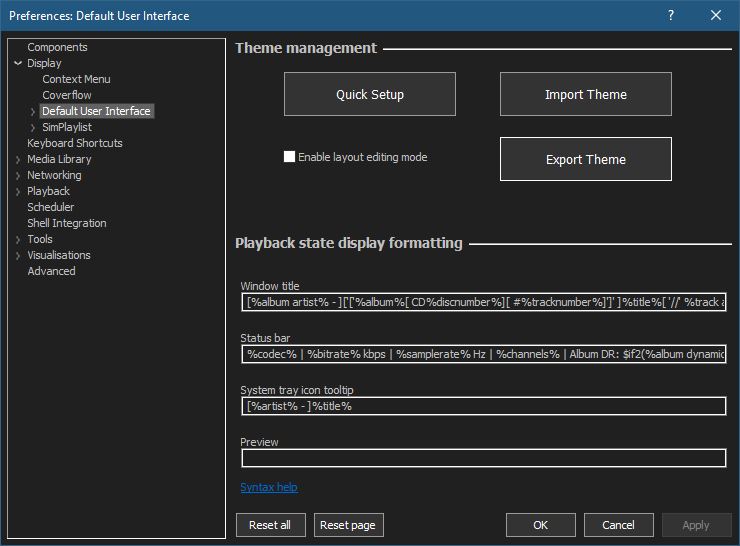
  5. Select View > Layout > Enable layout editing mode
  6. Right click the tab area in a panel and select Add New Tab
  7. Right click the new tab and rename it “Analog VU Meter” or whatever
  8. Right click the new tab display area and select Add New UI Element
  9. Select ‘Analog VU Meter (DirectX 12)’ from the list (Playback Visualization)
  10. Disable layout editing mode

Parameters:

Right mouse click on the meter display:

  • submenus – Layout / Mode / Levels / Decay / Tuning / Options
  • Fullscreen
  • Skin Selection

Mouse wheel (hover over meters)

  • Adjusts current Tuning selection

Resources:
Analog VU Meter Skin Gallery
Foobar2000 1.x ~ Installing Analog VU Meters

Sources:
www.hydrogenaud.io/forums/index.php?showtopic=33939
www.hydrogenaud.io/forums/index.php?showtopic=106793
www.head-fi.org/t/616963/the-foobar2000-resource-thread/45#post_9382013
foobar2000.ru/forum/viewtopic.php?t=5012 (Russian)

Discogs Album Art Visualizer


An album art visualizer for your Discogs collection.

discovers.antisound.net

Online Multichannel Peakmeter Using AudioWorklet


hydrogenaud.io/index.php/topic,126685

foo_dr_meter ~ Foobar2000 Dynamic Range Meter


A simple Dynamic Range meter based on DR estimation formula published by https://dr.loudness-war.info/. For foobar2000 version 1.5 and newer.

foobar.hyv.fi/?view=foo_dr_meter