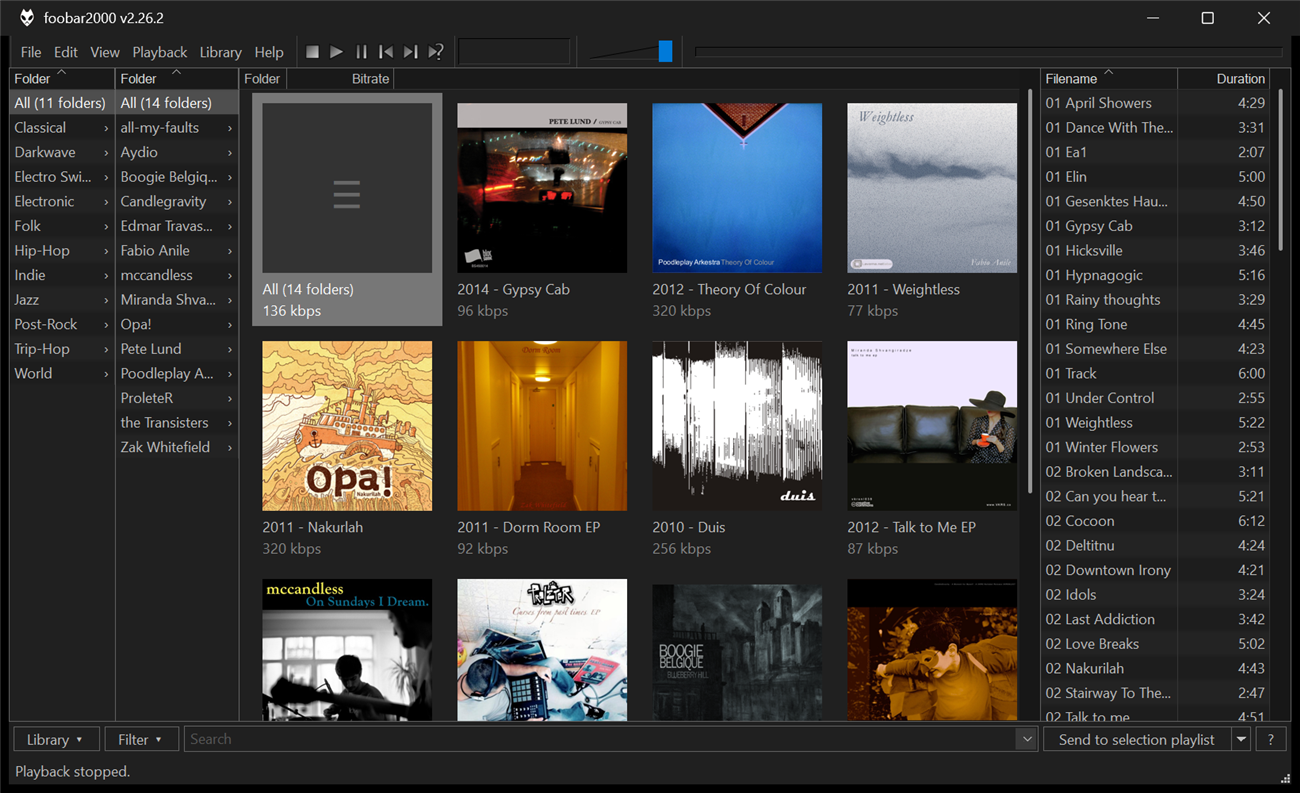
A media library browser for foobar2000 2.x that works like Facets by Frank Bicking (2007–2011). Facets was only ever released for 32-bit foobar2000 and predates the dark mode. Facet Browser runs natively in 64-bit foobar2000 and follows foobar2000’s dark mode and colour scheme. It is an independent reimplementation and contains no code from Facets.
Features (as in Facets)
Linked panes. Selecting items in one pane filters the panes to its right. Multi-select with Ctrl / Shift. Each pane has an optional summary item, e.g. “All (99 folders)”.
Folder column. Each pane that uses Folder shows the next folder level below the previous one, starting at your Media Library folder. Folders that contain more folders are marked with ›. Example: Folder › Folder › Folder › Filename.
Columns (right-click a pane header › Columns): Genre, Album artist, Artist, Date, Album, Track, Title, Filename, Filename.ext, Folder, or Multiple columns side by side. Column definitions are title formatting, edited in Preferences › Media Library › Facet Browser › Columns. %<field>% gives one entry per value of a multi-value tag. A|B lists every track under the value of Aand under the value of B (e.g. an initial letter or decade next to each artist or year), and the Default UI markers <dim> and >highlight< are shown as in the playlist view.
Statistics (header › Statistics): Bitrate, Duration, File created, First/Last added, First/Last played, First/Last release, Index, Items, Last modified, Lossless ratio, Played, Played duration, Rating, Subitems, Total peak, Total size, plus custom statistics you define yourself (a title formatting pattern combined as total, average, lowest or highest, in Preferences › Media Library › Facet Browser › Statistics). Click a header to sort by it. Column widths you set are remembered per pane (header › Columns › Reset column widths).
Sort by (header › Sort by): sort a pane by any of its columns or by any statistic, even one that is not displayed, ascending or descending.
Display (header › Display): Columns, or Album art with bottom labels, right labels or no labels; summary item on/off; Front, Back, Disc or Artist art; album art size per pane (Larger art / Smaller art, or Ctrl+mouse wheel over the pane).
Toolbar (bottom or top): Source (Library, Playlist, Automatic), Filter (your saved queries, optionally several at once), Search with history, the action button with its menu, and ? for query syntax help. Each item can be hidden (right-click the toolbar). With the Playlist source, the playlist’s selection follows what you pick in the panes.
Actions (toolbar button, double-click, Enter, right-click): Send to selection playlist, keep playing playlist · Send to selection playlist · Send to current playlist · Send to new playlist · Send to new autoplaylist · Add to selection playlist · Add to current playlist. Run on single click (action button menu) runs the action whenever the selection changes.
Right-click items for the actions above, the standard foobar2000 track menu, selection logic (OR / AND) and the Pane menu (insert, append, remove, cut, copy, paste).
Drag items into any playlist; drag the gaps between panes to resize them.