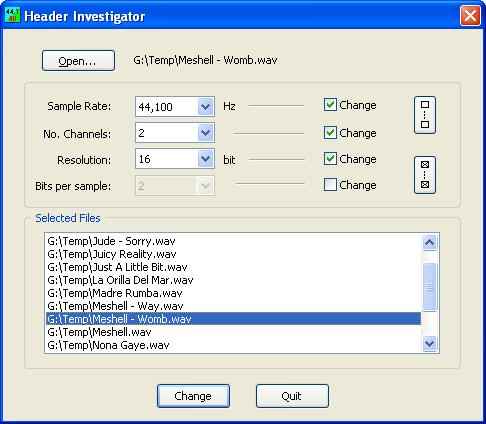
Header Investigator ~ WAV Header Editor


Header Investigator allows the user to open WAV audio files and display the header information and make changes.  The actual audio data is never changed… simply the header information.  This is useful if the user has accidentally recorded audio while locked to an external digital clock source so that the header sample rate is a mismatch to the actual sample rate of the data – which causes the sound file to play back at the wrong pitch.  By simply changing the sample rate in the header – the WAV files can be corrected without having to retransfer or sample rate convert the file.
www.railjonrogut.com/HeaderInvestigator

Lossless Audio Checker ~ Truly Lossless Or Not


Internet music dealers currently sell “CD-Quality” tracks, or even better (“Studio-Master”), thanks to lossless audio coding formats (FLAC, ALAC). However, a lossless format does not guarantee that the audio content is what it seems to be. The audio signal may have been upscaled (increasing the resolution), upsampled (increasing the sampling rate) or even transcoded from a lossy to a lossless format. Lossless Audio Checker analyzes lossless audio tracks and detects upscaling, upsampling and transcoding.

losslessaudiochecker.com

lossyWAV ~ Lossy PCM In WAV File Format


lossyWAV is a freelossy pre-processor for PCM audio contained in the WAV file format. Proposed by David Robinson, it reduces bit depth of the input signal, which, when used in conjunction with certain lossless codecs, reduces the bitrate of the encoded file significantly compared to unpreprocessed compression. lossyWAV’s primary goal is to maintain transparency with a high degree of confidence when processing any audio data. ~ wiki.hydrogenaud.io/index.php?title=LossyWAV

lossyWAV is a near lossless audio processor which dynamically reduces the bit depth of the signal on a block-by-block basis. Bit Depth reduction adds noise to the processed output. The added noise is adaptively shaped by default and can alternatively be fixed noise shaped or white noise depending on command line parameters. When lossyWAV processed output is compressed with certain lossless codecs (FLAC, Wavpack, Tak, LPAC, MPEG-4 ALS and WMA-Lossless) the bitrate of the output file is significantly[1] reduced compared to the lossless original.

[1]: on average, depending on content.

hydrogenaud.io/index.php/topic,112649
wiki.hydrogenaud.io/index.php?title=LossyWAV#lossyWAV_and_foobar2000
github.com/corrideat/lossywav
github.com/MoSal/lossywav-for-posix

FileZigZag ~ Online File Conversion


Our free audio converter is a fast and reliable service that lets you convert audio files online from one to many file formats also you can extract audio from video in high quality. You have three options to upload your files, select your audio from your PC or provide us URL or from Google drive.

https://www.filezigzag.com/online-audio-converter

Lplex ~ Create Lossless Audio DVDs


Lplex is a console application meant to provide a free, quick, and hopefully painless way to:

  • Create lossless “audio-only” dvd-video discs from wav or flac audio files, featuring:
    1. gapless playback.
    2. md5 verification of audio data.
    3. archival (dvd-rom) content.
  • Losslessly extract unencrypted lpcm audio streams from dvd-video to wav or flac format.

You’re already fully equipped for hi-res audio (up to 24-bit/96khz) if you have a typical dvd-player and digital amp, and lplex is a way to take advantage of this.

audioplex.sourceforge.net

FlicFlac ~ Tiny Audio Converter


FlicFlac is a portable (no installation required) utility for converting WAV, FLAC, MP3, OGG and APE files to any of the other formats.

You may drag files onto the FlicFlac interface, or convert files directly from the right click menu in Windows Explorer.

flicflac

www.sector-seven.net/software/flicflac

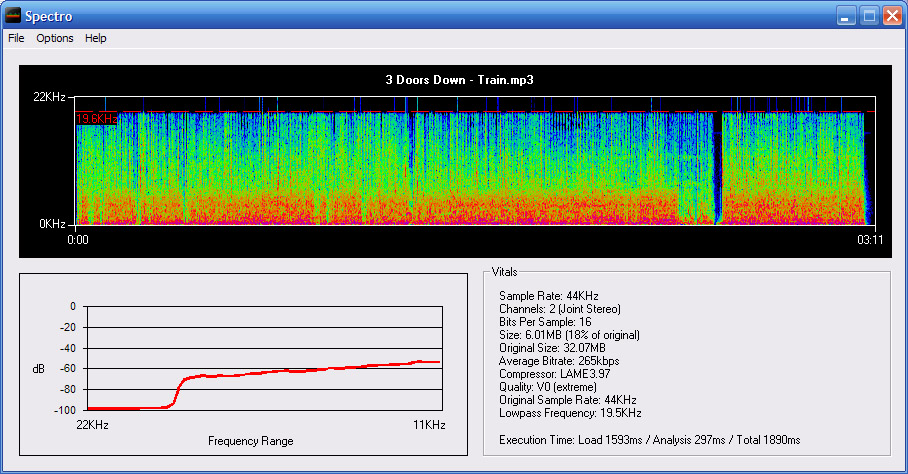
Spectro ~ Audio File Analyzer


Spectro is a freeware audio file analyzer for Windows. Currently capable of reading FLAC, APE, MP3 and WAV files. Spectro lets you view vital data about compressed audio files and creates a spectrogram of the wave data. This allows you to quickly and easily spot quality issues with a file and also look for transcodes.

spectro

spectro.enpts.com