itunesfm ~ iTunes & last.fm Integration


A small script to sync your play counts from last.fm back to iTunes. Supports both Windows and Mac OS X without any native dependencies. (Requires Music.app on OS X.)

Useful if you scrobble to last.fm from iTunes on multiple computers / devices and want to keep your local play counts consistent.

github.com/hansonw/itunesfm

Foobar2000 ~ EAC Log Viewer Script


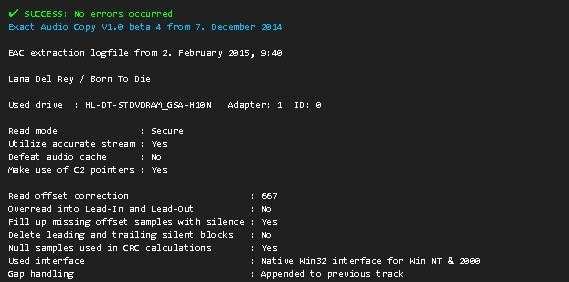
SMP EAC Log Viewer for Foobar2000

The SMP EAC Log Viewer is a Spider Monkey Panel (SMP) script for Foobar2000 designed to display Exact Audio Copy (EAC) log files in a DUI panel. It preserves the alignment of log columns, color-codes the conclusion lines for quick success/error identification, and prepends a summary line so it scrolls with the rest of the log.

Features:

  • DUI panel
  • Monospace font: Preserves column alignment in all EAC logs.
  • Color-coded conclusions:
    • Green = successful rip
    • Red = errors found
  • Summary line: Displays overall pass/fail and scrolls with the log.
  • Automatic log detection: Checks multiple common naming conventions:
    • %album%.log
    • %artist% - %album%.log
    • EAC.log

Installation:

  1. Download the script
    Get the latest version of the SMP script from the GitHub repository:
    github.com/tom2tec/foobar2000_smp_eac_log_viewer/releases
  2. Copy the script
    Copy and paste the eac_log_viewer_panel.js script into your preferred scripts folder. Typical choices:
    • C:\Users\<YourName>\Documents\Foobar\scripts
    • Or any folder you already use for SMP scripts.
  3. Add a Spider Monkey Panel
    • Open Foobar2000 and switch to your DUI layout.
    • Right-click → Add New UI Element → Spider Monkey Panel
    • Open the Edit Panel Script… pane and paste the contents of eac_log_viewer_panel.js. or point to the script’s location in Panel Properties → Script File → File.
  4. Adjust panel settings
    • Set the font to match your DUI theme (monospace).
    • Resize the panel to comfortably display the full log width.

Usage:

  • The panel automatically updates when:
    • You play a new track.
    • You change focus in the playlist.
  • Scroll through the log using your mouse wheel.
  • The summary line shows the overall rip status and scrolls with the text.
  • Color-coded lines highlight conclusions: green for success, red for errors.

Notes:

  • The script is optimized for one log per album, but will attempt all three naming conventions for flexibility.
  • Unusually named logs may require manual renaming in order to conform or add an input condition to the script.
  • DUI theming preserves font and panel appearance but maintains column alignment.

License

This project is licensed under the MIT License. See the included LICENSE file or the GitHub repository for details.

Download and Support

flacopyus ~ FLAC To Opus Library Transcription


Flacopyus is a CLI tool that mirrors your lossless FLAC library to a portable Opus collection. It performs rsync-like batch mirroring with incremental encoding/copying to save time. It preserves metadata and is idempotent, so repeated runs safely keep the destination in sync.

pypi.org/project/flacopyus/
github.com/curegit/flacopyus

DiscoDOS ~ Discogs Command Line


github.com/JOJ0/discodos
discodos.readthedocs.io/en/latest/index
www.discogs.com/forum/thread/1112957

Roon Command Line Project ~ Roon Automation & Control


The Roon Command Line project provides Bash and Python scripts to enable command line control of the Roon audio system over a local network.

Note: No modifications are made to the Roon Core. The RoonCommandLine package resides entirely on other systems within your local area network.

rooncommand.dev
github.com/doctorfree/RoonCommandLine

MusicSync ~ Synchronize Music Libraries


MusicSync is a cross-platform tool that synchronizes your music library between devices and drives with advanced settings.

You can use it through CLI, that makes easy to sync you library with only a click using a script, or through GUI, that is more user-friendly. Here there are two examples:

python musicsync D:/Music sdcard/Music --adb --min-rating 4.5 --output-format opus --output-bitrate 128k
python musicsync D:/Music sdcard/Music --adb --min-rating 3 --min-year 2020 --output-format opus --output-bitrate

github.com/serpest/MusicSync
hydrogenaud.io/index.php?topic=121169.0

Two flac2mp3 Scripts


flac2mp3 is a perl script that will search for flac files within
a directory hierarchy and convert them all to mp3 format, creating a
matching directory structure in the process.
robinbowes.github.io/flac2mp3
github.com/robinbowes/flac2mp3

This is a python script for transcoding flac files into mp3 files keeping covers, tags, and directory structure. It is multithreaded and creates as much thread as the number of cores on the host. The flac tags will be added to the mp3 files ut8 encoded, and if a cover.jpg file is found in the flac files directory it will be added to the mp3.

The mp3 generated will be itunes compliant (accents, covers) and encoded with lame command :

lame --silent -V2 --vbr-new -q0 --lowpass 19.7 --resample 44100
github.com/bamthomas/flac2mp3

microenc ~ Linux/BSD Batch Encoding Script


microenc is a small Bash shell script for Linux/BSD for encoding directories with audio files to other formats using FFmpeg as encoder.

Features:

  • Encodes to MP3, AAC, Vorbis, Opus, AC-3, E-AC-3, DTS, FLAC, ALAC, WavPack, AIFF and WAV audio
  • Auto-copying of metadata and, for MP3/AAC/FLAC/ALAC/AIFF, cover art
  • Optional high-quality audio resampling
  • Requires only ffmpeg and ffprobe
sourceforge.net/projects/microenc

eyeD3 ~ ID3 Python Script Development


eyeD3 is a Python tool for working with audio files, specifically MP3 files containing ID3 metadata (i.e. song info).

It provides a command-line tool (eyeD3) and a Python library (import eyed3) that can be used to write your own applications or plugins that are callable from the command-line tool.

eyed3.readthedocs.io/en/latest/index

github.com/nicfit/eyeD3

rmlyrics3 ~ Lyrics3 Tag Remover For mp3s


Before ID3v2 came around, Lyrics3 and Lyrics3v2 had their uses (extending the 30-char limit, placing synced lyrics), but nowadays they are a nuisance for most of us. Plus, we have the lyrics frames USLT and SYLT in ID3v2.

Lyrics3 tags come between the audio data and an ID3v1/ID3v1.1 tag at the end of the file (sometimes without the following ID3v1 tag, even if that is mandatory according to Lyrics3 specs). Current ffmpeg and some players and tools still have bugs and try to interpret Lyrics3 tags as audio data, resulting in obscure errors. Unfortunately, there are almost no tools out there to remove Lyrics3 tags—most programs ignore them, but write them back if changing tags. When removing ID3v1 tags from a file, this can result in the illegal situation mentioned above (having a Lyrics3 tag without a following ID3v1 tag)..

This code has been tested with thousands of files but I can give no guarantees. If you destroy your whole music collection, it’s not my fault. Please have a backup!

github.com/Moonbase59/rmlyrics3