Four easy steps to make your headphones sound better.
autoeq.app
github.com/jaakkopasanen/AutoEq

Four easy steps to make your headphones sound better.
autoeq.app
github.com/jaakkopasanen/AutoEq

The Audio Spatialisation for Headphones Toolset is a set of tools for headphone correction and binaural synthesis of spatial audio systems on headphones.
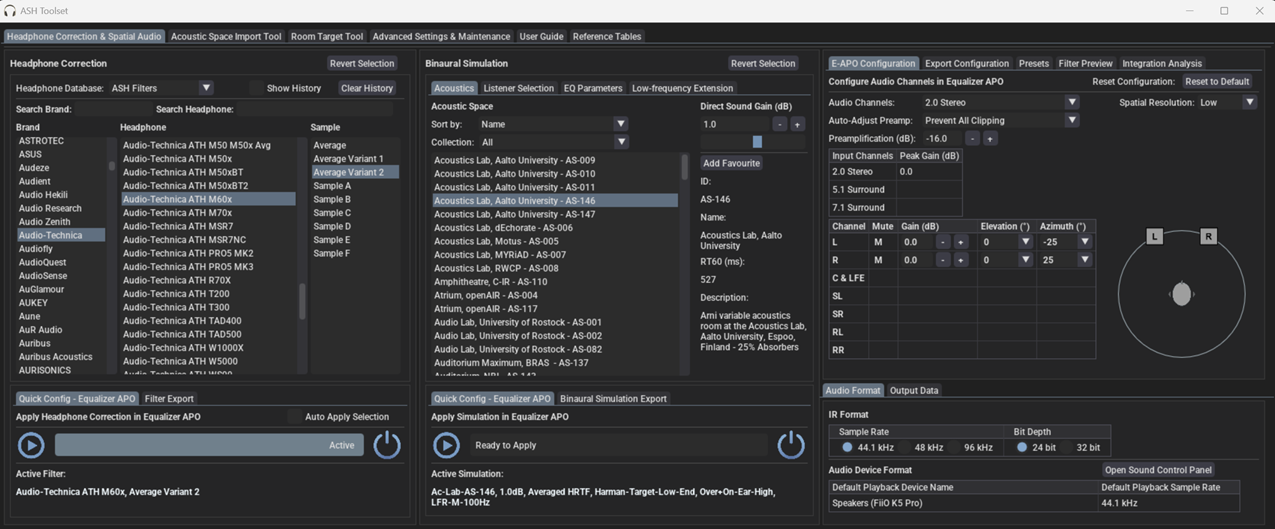
github.com/ShanonPearce/ASH-Toolset
sourceforge.net/projects/ash-toolset

Cavern is a fully adaptive object-based audio rendering engine and (up)mixer without limitations for home, cinema, and stage use. Audio transcoding and self-calibration libraries built on the Cavern engine are also available. This repository also features a Unity plugin and a standalone converter called Cavernize.
Cavern goes beyond fixed-channel audio systems by rendering any number of audio “objects” in three-dimensional space, tailored to the listener’s speaker arrangement or headphone output. It is also supported by a standalone conversion tool, Cavernize, which allows users to convert spatial mixes into conventional channel-based PCM formats while maintaining positional accuracy.
Object-Based Rendering
Cavern supports an unrestricted number of audio objects and output channels. This allows precise spatial placement and movement of sounds in 3D space, independent of specific channel layouts.
Codec and Container Support
The engine and its companion tools support a wide range of codecs and containers, including those commonly used for immersive audio delivery. Traditional formats such as WAV and common multimedia containers are also supported.
Calibration and Room Correction
Cavern includes tools for self-calibration and room equalization. These can flatten frequency response, compensate for acoustic irregularities, and help unify tonal characteristics across speakers.
Headphone Virtualization
Through HRTF-based processing, Cavern enables spatial rendering over stereo headphones. This simulates direction, distance, and spatial cues to reproduce the effect of multichannel speaker setups in a binaural listening environment.
Real-Time Up-Mixing
Legacy stereo or multichannel content can be up-mixed into fully rendered 3D scenes. This provides an immersive experience even when the source was not originally produced as object-based audio.
Integration with Game Engines
Cavern offers integration with Unity, enabling developers to incorporate real-time positional audio into games, simulations, and interactive media.
Home Cinema and Media Playback
Cavern can render object-based audio tracks for users who do not have commercial hardware processors. It allows accurate spatial playback through both speakers and headphones.
Headphone-Focused Listening
The binaural virtualization system benefits users who rely on headphones for movies, music, gaming, or general media consumption.
Game and VR Development
Developers can use Cavern inside Unity to produce dynamic, spatially accurate audio scenes in interactive applications.
Archiving and Conversion
Cavernize converts object-based audio into standard PCM or channel-based formats, preserving positional intent while enabling playback on conventional systems.
Speaker Optimization
Its calibration tools provide a software-based approach to room correction and multi-speaker alignment without requiring dedicated hardware processors.
Cavern stands out by making advanced spatial-audio technology accessible without requiring specialized hardware or proprietary processors. By combining open-source rendering, a flexible object-based architecture, codec support, calibration tools, and developer integration, it provides a versatile platform for enthusiasts, researchers, and media creators.
For users interested in experimenting with immersive audio workflows, whether for home cinema, headphone listening, archiving, or game development, Cavern offers a free, comprehensive and adaptable approach.
cavern.sbence.hu/cavern
github.com/VoidXH/Cavern
github.com/VoidXH/HRTF
cavern.sbence.hu/cavern/doc
cavern.sbence.hu/cavern/downloads
www.nuget.org/packages/Cavern
en.wikipedia.org/wiki/Digital_room_correction#Cavern_QuickEQ

Natural crossfeed Foobar2000 component designed to give a realistic crossfeed / speaker simulation effect on headphones or earphones while producing a wide soundstage and zero sound coloration.
Simulates speakers spaced 30+30 degrees apart (classic stereo setup with better front projection of imaging) or 50+50 degrees apart (widened stereo setup with more similarity to classic headphone soundstage width)
Update 2016-07-26: I’ve put the “secret” update in public as v2.1, containing a new set of impulses. They also come in 30+30 degree and 50+50 degree versions but are derived from actual measurements around my head.
Download link:
www.head-fi.org/threads/natural-crossfeed-on-headphones-earphones-for-foobar2000-v2-1-major-update-made-public.811837
Dropbox link to v1.1
Dropbox link to v2.1
hydrogenaud.io/index.php/topic,90662.0
foobar.hyv.fi/?view=foo_dsp_stereoconv (latest version)

WWSpatialAudioPlayer plays sound using Spatial sound API.
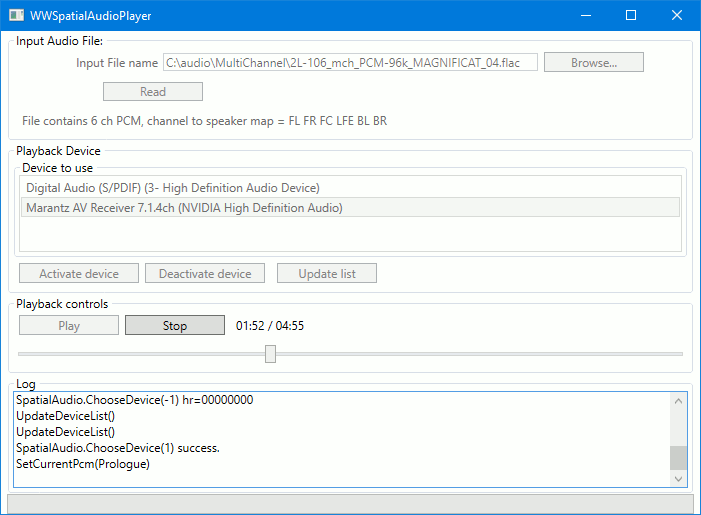
How to turn on Window’s 10 Spatial Sound ~ https://support.microsoft.com/en-us/windows/how-to-turn-on-spatial-sound-in-windows-10-ca2700a0-6519-448d-5434-56f499d59c96

AutoEQ is a project for equalizing headphone frequency responses automatically and it achieves this by parsing frequency response measurements and producing a equalization settings which correct the headphone to a neutral sound. This project currently has almost 2000 headphones covered in the results folder. See Usage for instructions how to use the results with different equalizer softwares and Results section for details about parameters and how the results were obtained.
AutoEQ is not just a collection of automatically produced headphone equalization settings but also a tool for equalizing headphones for yourself. frequency_response.py provides methods for reading data, equalizing it to a given target response and saving the results for usage with EqualizerAPO. It’s possible to use different compensation (target) curves, apply tilt for making the headphones brighter/darker and adding a bass boost. It’s even possible to make one headphone sound (roughly) like another headphone.
Third major contribution of this project is the measurement data and compensation curves all in a numerical format except for Crinacle’s raw data. Everything is stored as CSV files so they are easy to process with any programming language or even Microsoft Excel.
github.com/jaakkopasanen/AutoEq

This tool imitates the 7.1 to binaural sound effect of many surround virtualizations by making use of Equalizer APO’s convolution filter. Available impulse response that were recorded with activated…
- Dolby Atmos Headphone
- CMSS-3D
- SBX Pro Studio Surround (also found in BlasterX Acoustic Engine & THX TruStudio Pro)
- Dolby Headphone
- Sennheiser GSX Binaural 7.1
- DTS Headphone:X
- Windows Sonic Headphone
- Dolby Home Theater v4 Headphone Surround Virtualizer
- Razer Surround
- Out Of Your Head
- Flux HEar V3
- OpenAL and DirectSound3D HRTFs
- Waves Nx
- and many more!
Features:
- many different headphone surround impulse responses
- powerful graphic equalizer
- equalizer presets for over 1000 popular headphones
- use multiple devices on one sound card
- extensive control over different volume levels
- apply and save the processing onto your audio files
- fully configurable crossfeed
- quickly save & load profiles, even through hotkeys
- supports command line parameters for all options
- rearrange the virtual speakers’ positions
- intelligent stereo upmix
- portable installation with easy one-click updater
sourceforge.net/projects/hesuvi
sourceforge.net/p/hesuvi/wiki/Help
This fairly simple tool converts all HeSuVi 14 channel presets into 7.0 formatted _L/_R stereo pairs, for use with the soon to be updated PulseAudio module-virtual-surround-sink, which I’ve updated with a faster FFT overlap-save convolver, eliminated the sample length limits for impulses, and added support for asymmetrical/dual impulse mode.

System-wide audio equalizer for the Mac. Basic edition is free and open source. Improves your audio listening on OSX / macOS. Experience music on your Mac, how it’s meant to be.

eqmac.app
github.com/bitgapp/eqMac

Dolby Headphone technology gives you the sound of a 5.1 surround system through any pair of headphones.
It accurately models the surround sound listening experience of a properly set up and calibrated 5.1-channel speaker system, making it ideal for personal and portable surround listening.
This component wraps the functionality of a Dolby Headphone engine DLL (typically DOLBYHPH.DLL bundled with some software DVD players) to be used under Foobar2000. After installation you must configure the plugin pointing out the location of that DLL in your system and restart foobar2000. Amplification is provided by the Dolby Headphone engine itself.
Additional resources:
ww.head-fi.org/threads/5-1-headphone-experience-foobar-configuration-for-all-stereo-music-files.447089/
www.head-fi.org/threads/foobar2000-dolby-headphone-config-comment-discuss.555263/
www.dlldownloader.com/dolbyhph-dll/

A typical stereo records are being made to listen by speakers. That is a sound engineer makes the stereo mix to the adaptation of sound for listening of one channel by both ears. Therefore, you will be tired during a long time headphone listening more by a super-stereo effect than by a poor design of headphones. What’s missing in headphones is the sound going from each channel to the opposite ear, arriving a short time later for the extra distance traveled, and with a bit of high frequency roll-off for the shadowing effect of the head. And the time delay to the far ear is somewhat longer at low frequencies than at high frequencies. The Bauer stereophonic-to-binaural DSP (bs2b) is designed to improve headphone listening of stereo audio records…

If a tonal linearity, natural head-phonic imaging, and Hi-Fidelity are what you’re looking for, search for headphones matching the above reference DF curve the most.… BTW, the most accurate DF equalized headphones in the market is ER-4 from Etymotic Research …
Source: M.R.O.: Headphone equalization

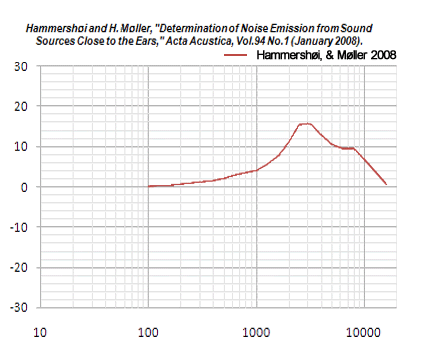
 The Audio File