caudec ~ Multiprocess Audio Converter


caudec is a command-line utility that transcodes (converts) audio files from one format (codec) to another, among other things.

It leverages multi-core CPUs and runs multiple processes concurrently (one per file and per codec, and more than one thread per codec when it supports it). The objective is to hog the CPU as much and as long as possible. One strategy is to sort input files by size, so that the largest files potentially get more threads towards the end of the job.

Features:

  • Supported input formats / codecs: WAV, AIFF, CAF, FLAC, WavPack, Monkey’s Audio, ALAC.
  • Supported output formats / codecs: all of the above, as well as LossyWAV / LossyFLAC, MP3, AAC (.m4a), Ogg Vorbis, Opus.
  • Supported platforms: macOS, Linux.
  • Transcoding to several different codecs at once is possible. In that case, decoding of input files is done only once.
  • Metadata is preserved (as much as possible) from one codec to another.
  • Artwork can be embedded into each file, and / or copied to the output directory. It can be done selectively (e.g. embed and / or copy one image for lossless files, and another image for lossy files).
  • Audio can be resampled (e.g. 48kHz to 44.1kHz) and downmixed (e.g. 6 channels to stereo). A profile can be provided to set a maximum value for the number of channels, bit depth and sampling rate. When a profile is provided, the source will only be altered after decoding and before encoding, if some metric of the source is above the given profile.
  • Multiprocess ReplayGain scanner for FLAC, WavPack, MP3, Ogg Vorbis, Opus.
  • Ability to hard link lossy files to a different directory when encoding to WavPack Hybrid. The point is to have two libraries that takes the storage of just one, with a lossy collection that has its own root directory and that’s easy to drag and drop to a device such as a smartphone or a Digital Audio Player (DAP).
  • Ability to touch files and album directories using metadata to reflect the music’s release date and duration (see example below).

github.com/gcocatre/caudec

ebook2audiobook ~ Convert eBook To Audiobook


CPU/GPU Converter from eBooks to audiobooks with chapters and metadata
using XTTSv2, Bark, Vits, Fairseq, YourTTS, Tacotron2 and more. Supports voice cloning and 1158 languages!

github.com/DrewThomasson/ebook2audiobook

wo-audio-converter ~ Audio File Converter


Offline audio file converter powered by ffmpeg wasm.

github.com/thurti/wo-audio-converter
worksoffline.app/audio-converter/

SOX-DSD ~ SoX With DSD For Windows.


Here located unofficial builds of the SoX (Sound eXchange) audio tool with DSD support and other patches (including both DSF & DFF I/O and SDM sox “effect” to convert from PCM to DSD) for OS Windows only. Provided two Windows executable files for 32 & 64 bit systems. Binaries were cross-compiled on Linux using MinGW/gcc on fully static way.

  •  DSF I/O
  •  DFF I/O
  •  SDM effect to convert from PCM to DSD
github.com/turbulentie/sox-dsd-win

Two flac2mp3 Scripts


flac2mp3 is a perl script that will search for flac files within
a directory hierarchy and convert them all to mp3 format, creating a
matching directory structure in the process.
robinbowes.github.io/flac2mp3
github.com/robinbowes/flac2mp3

This is a python script for transcoding flac files into mp3 files keeping covers, tags, and directory structure. It is multithreaded and creates as much thread as the number of cores on the host. The flac tags will be added to the mp3 files ut8 encoded, and if a cover.jpg file is found in the flac files directory it will be added to the mp3.

The mp3 generated will be itunes compliant (accents, covers) and encoded with lame command :

lame --silent -V2 --vbr-new -q0 --lowpass 19.7 --resample 44100
github.com/bamthomas/flac2mp3

Vitomu ~ Video To Audio Converter


Vitomu stands for VIdeo TO MUsic converter. It allows easy conversion of online and offline videos to audio files. Just drop a URL or a local video file on the target to start the conversion. The current version supports dropping URLs of both YouTube videos and local MKV and MP4 files.

github.com/digimezzo/vitomu

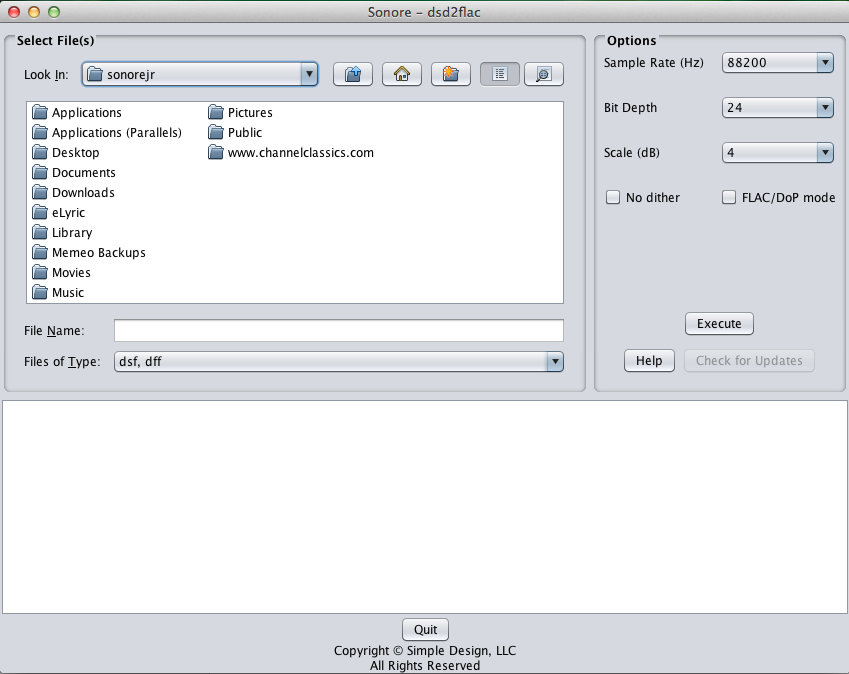
DSD2FLAC ~ Convert DSD To FLAC


DSD2FLAC converts DSD files to FLAC

Features:

  • Supports DSD input files in .dsf and .dff formats
  • Supports DSD64 and DSD128 input rates
  • Selectable output sample rates: 88.2KHz (default), 176.4KHz or 352.8KHz
  • Selectable bit depth: 16, 20, 24 (default)
  • Volume scale: -6db to +6db (+4 db default)
  • Dither: on (default) or off
  • Optional output mode in DoP2FLAC for use by a player that supports FLAC and a DAC that supports DoP input
  • Transfers stored metadata from the original DSD file to the resulting FLAC file
  • Single title conversion or entire album conversion in a given folder

This application is provided as-is without warranty or support.
Development for this application is closed.

www.sonore.us/dsd2flac

DawVert ~ The DAW ConVERTer


DawVert is a Project File Converter

github.com/SatyrDiamond/DawVert

ReSampler ~ Command Line Audio Conversion


ReSampler is a high-performance command-line audio sample rate conversion tool which can convert audio file formats with a variety of different bit-depths and audio channel configurations. ReSampler compiles and runs on WindowsLinux and macOS

github.com/jniemann66/ReSampler

AllToMP3 ~ Download & Conversion Utility


Download and Convert YouTube, SoundCloud & Spotify in MP3 with full tags (title, artist, genre, cover, lyrics) AllToMP3 is a desktop application to download and convert YouTube, SoundCloud, Spotify and Deezer in 256 kb/s MP3, with tags: cover, title, artist, genre, and even lyrics!. It supports YouTube playlists, Deezer, and Spotify playlists, and also integrates a search engine so you can simply specify a song name or an album and AllToMP3 will download it…

  • Download AllToMP3 for Windows, macOS and Linux
  • If you encounter any problem, try to add an exception for AllToMP3 or to deactivate it
  • On macOS or Windows you will need a valid certificate so the application can be signed
  • You need basic knowledge of programming and using Github to create a new translation
  • You need to know two letter country code for language
  • Requires Node 10 + NPM
sourceforge.net/projects/alltomp3.mirror

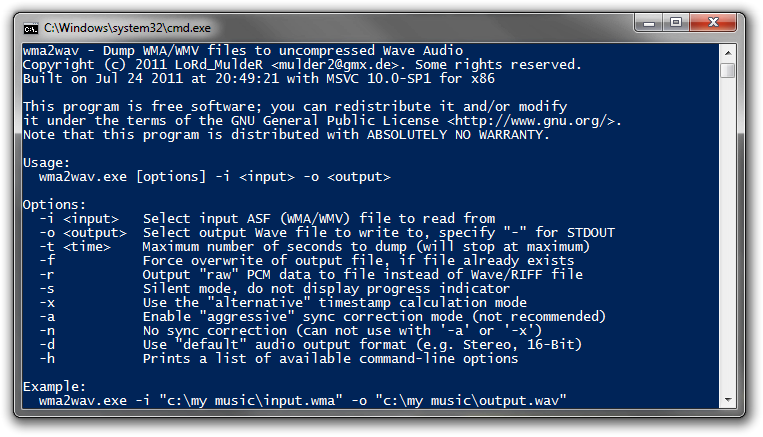
wma2wav ~ Convert WMA To Wave Audio


WMA to Wave Audio command-line converter / decompressor.

http://muldersoft.com/#wma2wav

QMP3Gain ~ MP3Gain Graphical User Interface


User interface front end supporting famous MP3Gain engine which analyzes and losslessly adjusts MP3 files to a specified target volume. A complete re-creation (made in QT5) of the original MP3Gain GUI, however it can be run on more platforms.

Features:

  • MP3
  • volume
  • lossless
  • multiplatform
  • GUI

sourceforge.net/projects/qmp3gain