
The purpose of beets is to get your music collection right once and for all. It catalogs your collection, automatically improving its metadata as it goes using the MusicBrainz database. Then it provides a bouquet of tools for manipulating and accessing your music.
Because beets is designed as a library, it can do almost anything you can imagine for your music collection. Via plugins, beets becomes a panacea:
- Fetch or calculate all the metadata you could possibly need: album art, lyrics, genres, tempos, ReplayGain levels, or acoustic fingerprints.
- Get metadata from MusicBrainz, Discogs or Beatport. Or guess metadata using songs’ filenames or their acoustic fingerprints.
- Transcode audio to any format you like.
- Check your library for duplicate tracks and albums or for albums that are missing tracks
- Browse your music library graphically through a Web browser and play it in any browser that supports HTML5 Audio and lots more.
Category Archives: Scripting

NirCmd ~ Windows Command Line Tool
NirCmd is a small command-line utility that allows you to do some useful tasks without displaying a user interface. By running NirCmd with simple command-line options, or via a shortcut, you can decrease or increase the system volume, mute or unmute the system volume, speak the text currently in the clipboard or text file, change the default sound device, display a list of sound devices, change the volume of an app, change the display settings, turn off the monitor, open the door of a CD-ROM drive and more…
www.nirsoft.net/utils/nircmd
Command Reference
Change Default Sound Device
List Sound Devices
Change System Volume
Change App Volume
Share this:

foo_playcount ~ Foobar2000 Playback Stats
You can extend Foobar2000 functionality by increasing the information the player maintains. Installing the foo_playcount component allows Foobar to both keep track of additional data, and adds the following user available fields:
- Date and time a track was first played ~ %first_played%
- Date and time a track was last played ~ %last_played%
- The number of times a track has been played ~ %play_count%
- Date and time a track was first added to the Media Library ~ %added%
- Song rating ~ %rating%
Song Rating Playlist Display
The songs rating can now be displayed in a playlist viewer in two ways:
- On a 1 to 5 scale with %rating%
- Displayed as up to five stars, “★★★”, with %rating_stars%
- Displayed as five stars, “★★★☆☆”, with %rating_stars_fixed%
Note: This component should be installed at the same time as Foobar2000, if your goal is to have a complete play count history.
Discussion
Download
Documentation
Display (Title) Formattingplaylist viewer
foo_playcount_2003
This component uses the same database backend that foo_playcount utilises for logging plays but has many more advanced features and fewer limitations.
- Playcounts and dates can edited for any context menu selection.
- Data can be imported from file tags or fields provided by other components.
- Ratings up to 10 are supported.
- You can customise how long you have to listen before a play count is incremented.
- The current time is available via title formatting as a full date time string or Unix timestamp.
- First played, last played and added are all available as Unix timestamps.
- How records are bound to tracks can be configured in the
Advanced Preferences.
marc2k3.github.io/component/playcount-2003
Share this:

MusicBrainz Picard ~ Tag Audio Files With MusicBrainz Metadata
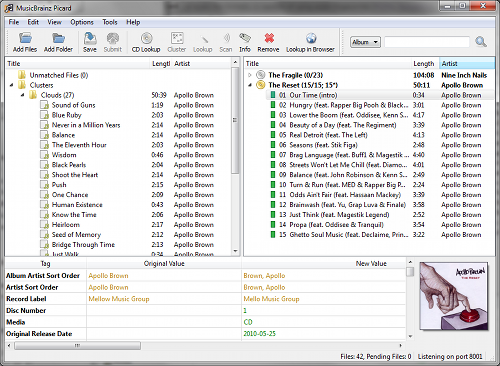
MusicBrainz Picard is a cross-platform (Linux, macOS, Windows) audio tagging application. It is the official MusicBrainz tagger.
Picard supports the majority of audio file formats, is capable of using audio fingerprints (AcoustIDs), performing CD lookups and disc ID submissions, and it has excellent Unicode support. Additionally, there are several plugins available that extend Picard’s features.
Features:
- Multiple formats: Picard supports all popular music formats, including MP3, FLAC, OGG, M4A, WMA, WAV, and more.
- AcoustID: Picard uses AcoustID audio fingerprints, allowing files to be identified by the actual music, even if they have no metadata.
- Comprehensive database: Picard uses the open and community-maintained MusicBrainz database to provide accurate information about millions of music releases.
- CD lookups: Picard can lookup entire music CDs with a click.
- Plugin support: If you need a particular feature, you can choose from a selection of available plugins or write your own.
- Scripting: A flexible and powerful, yet easy to learn, scripting language allows you to exactly specify how your music files will be named and how the tags will look like.
- Cover Art: Picard can find and download the correct cover art for your albums.
- Open Source: Picard is licensed under the GNU General Public License 2.0 or later, and is hosted on GitHub where it is actively developed.
picard.musicbrainz.org
picard.musicbrainz.org/downloads
picard.musicbrainz.org/plugins
picard.musicbrainz.org/docs/faq
picard.musicbrainz.org/quick-start
github.com/metabrainz/picard
Youtube: What is MusicBrainz Picard?
Share this:

PowerShell Audio ~ Automate Conversions / Tagging
An extensible, multi-format audio conversion and tagging module for Windows PowerShell™
github.com/jherby2k/PowerShellAudio/releases
Primer
List of Cmdlets
Script Examples
Hydrogen Audio Forum
Hydrogen Audio Wiki

 The Audio File