Foobar2000 ~ Installing A Lyrics Display Panel


Installing and Configuring OpenLyrics (foo_openlyrics) in foobar2000

OpenLyrics (foo_openlyrics) is the most actively maintained lyrics display component for foobar2000. It provides an integrated lyrics panel, automatic lyrics downloading, local storage, and optional editing support. This guide walks through installation, panel setup, and recommended configuration options.


Step 1: Download OpenLyrics

  1. Visit the official OpenLyrics component page:
    www.foobar2000.org/components/view/foo_openlyrics
  2. Download the latest .fb2k-component file.

Step 2: Install the Component

  1. Open foobar2000.
  2. Go to File → Preferences → Components.
  3. Click Install….
  4. Select the downloaded foo_openlyrics.fb2k-component file.
  5. Click Apply.
  6. Restart foobar2000 when prompted.

After restarting, OpenLyrics will be available as both a lyrics provider and a UI panel.


Step 3: Add the OpenLyrics Panel to the Layout

Default UI

  1. Go to View → Layout → Enable Layout Editing Mode.
  2. Right-click inside the layout where you want the lyrics panel.
  3. Choose Add New UI Element → Visualisations → OpenLyrics.
  4. Resize and position the panel as desired.
  5. Disable layout editing mode when finished.

Columns UI

  1. Go to Preferences → Display → Columns UI → Layout.
  2. Insert a new panel where desired.
  3. Select OpenLyrics from the panel list.
  4. Apply changes.

Step 4: Basic Playback Test

  1. Play a track with standard artist and title metadata.
  2. OpenLyrics will attempt to fetch lyrics automatically.
  3. If lyrics are found, they will display in the panel.
  4. If nothing appears immediately, allow a few seconds or manually trigger a search (see below).

Step 5: Configure Lyrics Sources

  1. Go to File → Preferences → Tools → OpenLyrics.
  2. Open the Sources section.
  3. Enable or disable lyrics providers as desired.
  4. Adjust source priority if available.

Notes:

  • Online lyrics availability depends on track metadata accuracy.
  • Some sources may return timed lyrics; others return plain text.
  • Source reliability can change over time, which is why OpenLyrics allows multiple providers.

Step 6: Configure Lyrics Saving and Storage

  1. In Preferences → Tools → OpenLyrics, locate the Saving or Storage options.
  2. Enable automatic saving of lyrics if you want lyrics cached locally.
  3. Choose a storage method:
    • External .lrc or .txt files
    • Embedded lyrics tags (if supported by your workflow)
  4. Define a lyrics file naming and folder structure if saving externally.

Recommended:

  • Saving lyrics externally allows reuse across systems and avoids repeated downloads.
  • Keeping lyrics alongside audio files simplifies backup and portability.

Step 7: Display and Behavior Settings

Within Preferences → Tools → OpenLyrics, review the display options:

  • Automatic scrolling
  • Alignment and text behavior
  • Timed lyrics synchronization behavior
  • Fallback handling when timed lyrics are unavailable

These settings affect how lyrics are rendered in the panel but do not affect stored data.


Step 8: Manual Search and Editing

If lyrics are not found automatically:

  1. Right-click inside the OpenLyrics panel.
  2. Choose Search lyrics or Edit lyrics (wording may vary by version).
  3. Manually paste or edit lyrics as needed.
  4. Save the lyrics so they persist for future playback.

OpenLyrics includes a built-in editor, allowing corrections or manual entry without external tools.


Step 9: Metadata Best Practices

For best results with OpenLyrics:

  • Ensure %artist% and %title% tags are accurate.
  • Avoid extra text such as “(Remastered)” or “feat.” in titles unless required.
  • Album artist tags can improve search accuracy for compilations.

Clean metadata significantly improves lyrics retrieval success.


Step 10: Troubleshooting

If lyrics do not appear:

  • Verify OpenLyrics is enabled under Preferences → Components.
  • Confirm the panel is visible and active.
  • Check that playback is active (lyrics are not fetched for stopped tracks).
  • Try manual search from the panel context menu.
  • Review source availability in the OpenLyrics preferences.

Summary

OpenLyrics is currently the most complete and actively maintained lyrics solution for foobar2000. Once installed and configured, it provides automatic lyrics retrieval, reliable local storage, and flexible display options suitable for both minimal and advanced layouts.

For new foobar2000 installations or users modernizing older setups, OpenLyrics is the recommended lyrics display component.

foobar2000 ~ foo_vis_spectrum_analyzer


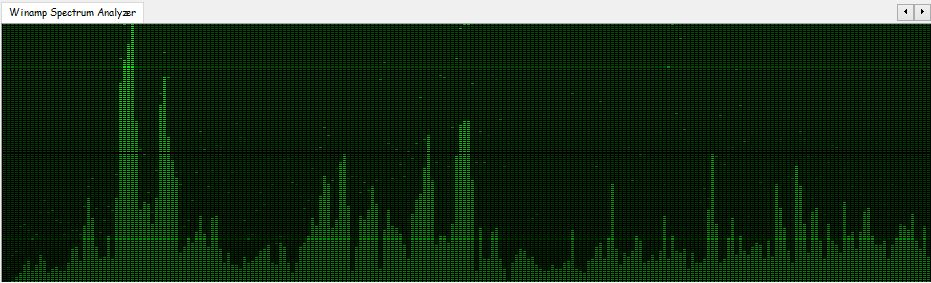
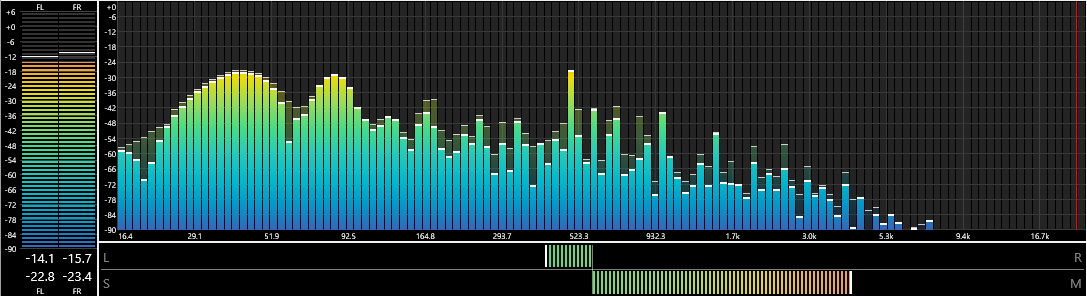
foo_vis_spectrum_analyzer is a foobar2000 component that implements a spectrum analyzer panel. It is an attempt to recreate the foo_musical_spectrum component by fismineur for foobar2000 64-bit.

hydrogenaudio.org/index.php/topic,125031.0
www.foobar2000.org/components/view/foo_vis_spectrum_analyzer
github.com/stuerp/foo_vis_spectrum_analyzer

foo_masstagger ~ Automate Foobar2000 Tag Editing


Automates various tag editing operations.

www.foobar2000.org/components/view/foo_masstag
wiki.hydrogenaudio.org/…/Masstagger_(foo_masstag)

Usage:

Adding MOOD tags:

  1. Select tracks
  2. Right-click → Tagging → Manage Scripts
  3. Create a script:
    • Add value
    • Field: MOOD
    • Value: Calm
  4. Save as preset (Mood: Calm)

Repeat once per mood.

After that:

  1. Select tracks
  2. Right Click > Tagging > Scripts
  3. Apply mood script preset

foo_vis_goom ~ What a GOOM! Visualisation


foo_vis_goom is a port for foobar2000 of the “What a GOOM!” music visualizer. It renders the library-provided pixels using OpenGL 4.6.

GOOM in an “incredible trippy visualization plugin!!”

Features:

  • Uses OpenGL 4.6 for rendering.
  • The Goom-2k4 library has been extensively cleaned up.
  • Compatible with the Default User Interface (Default UI) and the Columns User Interface (Columns UI).
  • Tested on foobar2000 v2.25.3 (x86 32-bit and x86 64-bit) and Microsoft Windows 11 (Build 26200).

www.foobar2000.org/components/view/foo_vis_goom

Foobar2000 ~ foo_whatsnew Feature Watcher


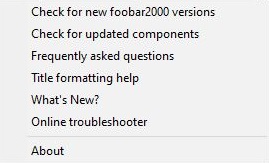
foo_whatsnew monitors your foobar2000 installation for any new additions or changes and records them. After installing foo_whatsnew, there will be a What's New? menu option on the Help menu which opens a panel displaying a list of recent changes. There’s now support for 64 bit installs and dark mode.

www.foobar2000.org/components/view/foo_whatsnew

After downloading the component, double click on it to install it and restart foobar2000.

References:

foosion.foobar2000.org/components/?id=whatsnew&version=1.0.7
github.com/stengerh/foo_whatsnew

foo_enhanced_playcount ~ Enhanced Playback Statistics


This Foobar2000 component collects and maintains enhanced statistics for played songs; primarily it records the timestamp of every play of a song, and not just the first and last. It will also query last.fm and record play times of every scrobble for a song.

foo_enhanced_playcount provides some additional functionality that foo_playcount does not, but is missing some functionality that foo_playcount has. They work well together, and foo_playcount should NOT be uninstalled when foo_enhanced_playcount is installed.

This component should be installed with foo_playcount and the same time foobar2000 is installed so playback statistics are maintained from the beginning.

New Fields:

  • %played_times% – Date formatted list: ["2012-08-04 15:58:37", "2012-12-10 14:40:46", "2018-01-02 23:38:13"]
  • %played_times_js% – JS timestamp list: [1344117517000, 1355172047000, 1514957893431]
  • %played_times_raw% – raw foobar timestamps: [129885911170000000, 129996456470000000, 131594314930000000]There’s probably no reason to ever use this.
  • %lastfm_played_times% – Date formatted list of scrobbles: ["2012-08-04 15:58:37", "2012-12-10 14:40:46", "2018-01-02 23:38:13"]
  • %lastfm_played_times_js% – JS timestamp list: [1344117517000, 1355172047000, 1514957893000]
  • %lastfm_play_count% – Count of last.fm plays, a la %play_count%: 5
  • %lastfm_added% – Single date: “2012-08-04 15:58:37
  • %lastfm_first_played% – Always exactly the same as %lastfm_added%. Use whichever one makes most sense logically
  • %lastfm_last_played% – Single date: “2018-04-04 15:58:37
  • %added_enhanced% – Returns the earliest of %added% (from foo_playcount) or %lastfm_added%. Single date: “2023-02-04 15:16:17
  • %first_played_enhanced% – Returns the earliest of %first_played% (from foo_playcount) or %lastfm_added%. Single date: “2023-02-04 15:16:17
  • %last_played_enhanced% – Returns the earliest of %last_played% (from foo_playcount) or %lastfm_last_played%. Single date: “2023-02-04 15:16:17

These fields can be exposed via Title Formatting or used in scripts. This component does generate extra data per song played and may not be suitable for installations with limited storage.

www.foobar2000.org/components/view/foo_enhanced_playcount
github.com/kbuffington/foo_enhanced_playcount
wiki.hydrogenaud.io/…/foo_enhanced_playcount

Foobar2000 ~ Installing Analog VU Meters


Adding an analog VU meter to the Foobar2000 2.x Default User Interface

Required component: foo_vis_vumeter

Directions:

  1. Download foo_vis_vumeter
  2. Click on foo_vis_vumeter which should install the component
  3. Click Apply and then Ok to restart Foobar
  4. Copy some .bin skin files to the …\AppData\Roaming\foobar2000-v2\vumeter folder (Shift+File>Browse configuration folder)
  5. Select View > Layout > Enable layout editing mode
  6. Right click the tab area in a panel and select Add New Tab
  7. Right click the new tab and rename it “Analog VU Meter” or whatever
  8. Right click the new tab display area and select Add New UI Element
  9. Select ‘Analog VU Meter (DirectX 12)’ from the list (Playback Visualization)
  10. Disable layout editing mode

Parameters:

Right mouse click on the meter display:

  • submenus – Layout / Mode / Levels / Decay / Tuning / Options
  • Fullscreen
  • Skin Selection

Mouse wheel (hover over meters)

  • Adjusts current Tuning selection

Resources:
Analog VU Meter Skin Gallery
Foobar2000 1.x ~ Installing Analog VU Meters

Sources:
www.hydrogenaud.io/forums/index.php?showtopic=33939
www.hydrogenaud.io/forums/index.php?showtopic=106793
www.head-fi.org/t/616963/the-foobar2000-resource-thread/45#post_9382013
foobar2000.ru/forum/viewtopic.php?t=5012 (Russian)

foo_listenbrainz ~ Submit Listens To ListenBrainz


Status: alpha.

  • [+] submits listens while online
  • [+] provides UI to configure user name and token
  • [-] no checks for online status, no exception handling
  • [-] no caching of the listens history while offline
  • [-] configurable server url
  • [-] no separate thread for network requests

    gitlab.com/ykBuilds/foo_listenbrainz

Updated ListenBrainz foobar2000 component
audio-file.org/2023/11/21/foo_listenbrainz-foobar2000-listenbrainz/
github.com/phw/foo_listenbrainz2

foo_vis_milk2 ~ Foobar2000 MilkDrop 2 Visualizer


foo_vis_milk2 is a port for foobar2000 of Winamp’s MilkDrop 2 music visualizer. It additionally migrates rendering from its original DirectX 9 to DirectX 11.

MilkDrop 2 takes you flying through visualizations of the soundwaves you’re hearing. It uses beat detection to trigger myriad psychedelic effects, creating a rich visual journey through sound.

Features:

  • Uses DirectX 11 for rendering.
  • Uses updated libraries.
  • vis_milk2 has been upgraded to use more modern C++ alongside DirectX 11. Deprecated or insecure functions have been rewritten and most unused functionality removed.
  • Configurable through foobar2000 preferences instead of INI files.
  • Supports the Default User Interface (Default UI) only.
  • Tested on foobar2000 v2.1.2 (x86 32-bit and x86 64-bit) and Microsoft Windows 11 (Build 22621).

www.foobar2000.org/components/view/foo_vis_milk2

foo_musicbrainz ~ Foobar2000 MusicBrainz Tagger


Allows tagging files using data from MusicBrainz.

Features:

  • Fetches data by automatically calculated MusicBrainz Disc ID, existing Artist/Album or MusicBrainz Album ID tags
  • Uses the latest version of MusicBrainz web service, which corresponds to the NGS data model
  • Supports many different tags, including artist, album, date, tracknumber/totaltracks, discnumber/totaldiscs, label, catalog number, barcode etc.
  • Supports MusicBrainz-specific tags: Artist ID, Album ID, Release Group ID, Disc ID, Track ID, album type, album status
  • Missing TOCs can be submitted to MusicBrainz from the context menu.
www.foobar2000.org/components/view/foo_musicbrainz

foo_listenbrainz2 ~ Foobar2000 & ListenBrainz


ListenBrainz 2

A foobar2000 component to submit the music you listened to to ListenBrainz or another ListenBrainz compatible scrobble server (for example Maloja).

This component was originally written by marc2k3. This repository is an attempt to preserve the source code of this excellent component and hopefully to revive the development.

github.com/phw/foo_listenbrainz2

What is ListenBrainz? ListenBrainz keeps track of music you listen to and provides you with insights into your listening habits. For details see:

listenbrainz.org

References:

en.wikipedia.org/wiki/ListenBrainz

foo_dsp_vst3 ~ Foobar2000 Hosts VST Plugins


Official component that allows VST effects to be used as DSPs in foobar2000.

www.foobar2000.org/components/view/foo_dsp_vst3
hydrogenaud.io/index.php/topic,123342.0