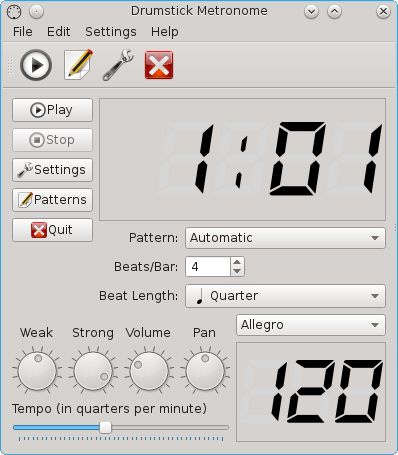
Drumstick Metronome is a MIDI based metronome using the ALSA sequencer. It’s intended for musicians and music students, as a tool to keep the rhythm while playing musical instruments. It uses MIDI for sound generation instead of digital audio, allowing low CPU usage and very accurate timing, thanks to the ALSA sequencer.
Features:
Easy to use graphic user interface.
MIDI only. Can be used with software or external MIDI synthesizers.
Based on ALSA sequencer. Provides input and output ports
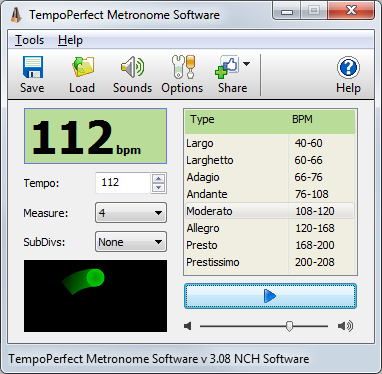
TempoPerfect is a free software metronome. Unlike mechanical metronomes, our software metronome provides a clear and precise beat that won’t wind down, making it an essential tool for any musician.
Simple and intuitive interface
Highly accurate beat simulation
Accent the first beat in a measure
Preset tempos include Largo, Allegro, Presto and more
Visual beat indicator bar provides a helpful visual cue
Create accurate beat patterns for simple or complex rhythms
Subdivide beats to hear difficult patterns, such as triplets
BPM Tempo Guide chart for each speed of music (e.g., Allegro=120-168)
Subdivide beats into accented beats and regular beats to emphasize different patterns
Use on your computer or as a metronome app on your mobile device
TempoPerfect also includes a tempo guide within the program which is a helpful resource for remembering the BPM for particular speed markings (e.g., Allegro).
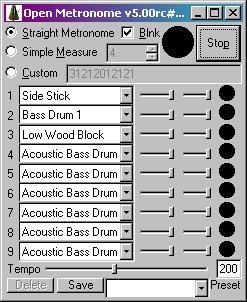
Free open source GPL metronome (a “branch” of “Weird Metronome“) for Windows, Windows Mobile, & Pocket PC. Uses user-definable multi-voice WAV or MIDI (PC only) sounds for the beats. Has a blinker & allows user defined bpm & fine measure control.
Features:
Accurate metronome sound! No skips or variation in audio output!
Custom rhythm patterns: use it as a (very basic) drum machine
User definable beats per minute
Set measure to any length, with emphasis on any beat(s)
Over 40 MIDI voices, optionally available as WAV samples
Up to nine simultaneous voices per beat
Add your own WAV samples to use whatever sounds you like
Highly customizable parameters
Define HotKeys to perform functions such as increase tempo
Set the Maximum & minimum tempo available via the tempo slider
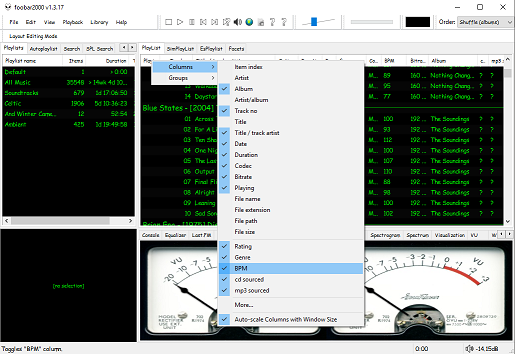
The second step is adding a new BPM playlist column to the DUI playlist viewer:
Right click the playlist header and select columns. Toggle the BPM column on.
The third step, add an Analyze BPM toolbar button:
Right click on the metronome icon ico file shown below and download / save it locally
Right click the Foobar toolbar
Select the Customize button
Select from Available Commands [context] > BPM Analyzer > Automatically analyze BPMs
Click Add
Click Change Icon and select the downloaded metronome.ico file
Click OK
metronome.ico (right click and save the link ico file locally)
The fourth step is to select and scan files:
Once the toolbar button is installed, songs can be selected then scanned. The songs will now be tagged with the %bpm% tag and can be selected or sorted by beats per minute as displayed in the playlist column.
The fifth step is to update your entire library:
Open Library > Search and insert the query %bpm% MISSING then click … and then click Create Autoplaylist. Rename the new autoplaylist located at the bottom of the playlist switcher Missing BPM. Activate the playlist, select the entire contents, automatically analyze them and then apply the changes.









 The Audio File