foo_uie_webview ~ Foobar2000 Webapps


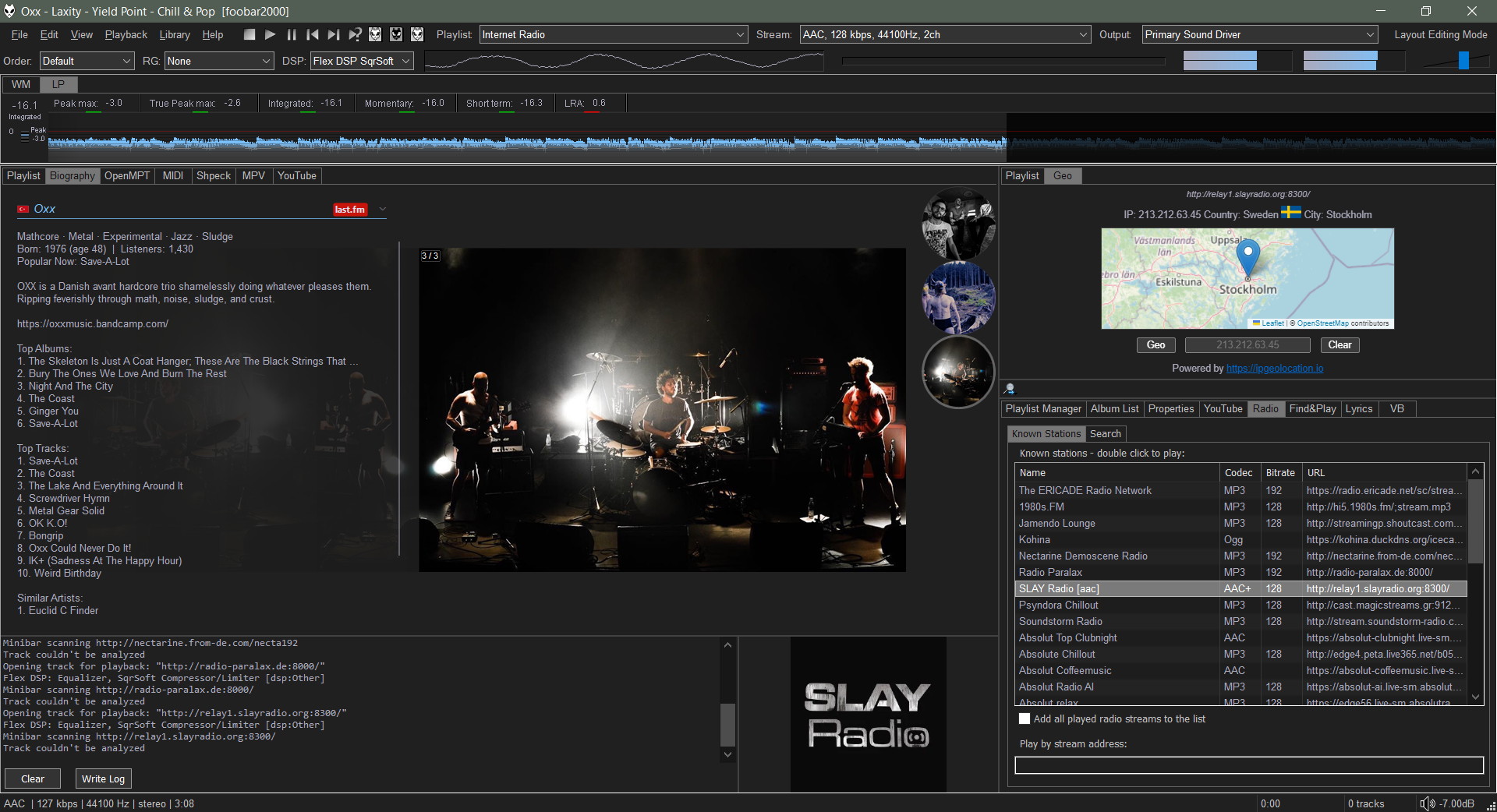
foo_uie_webview is a foobar2000 component that exposes the Microsoft WebView2 control as UI panel. The component started as foo_vis_text.

It takes an HTML file that receives playback notifications from foobar2000. The panel can react to those notifications and adjust its output using JavaScript code.

Features:

  • Supports the Default User Interface (DUI) and the Columns User Interface (CUI).
  • Supports dark mode.
  • Supports foobar2000 2.0 and later (32-bit and 64-bit version).

github.com/stuerp/foo_uie_webview
Topic: foo_uie_webview
Topic: Made with foo_uie_webview

Gallery

foo_resume ~ Foobar Remembers Playback Positions


A lightweight foobar2000 component that automatically remembers and resumes the playback position for every track.

Features:

  • Remembers the last playback position for every unique track in your library.
  • Easily enabled or disabled via the advanced settings menu.
  • Stores data in a simple text file within your foobar2000 profile folder.

github.com/reda777/foo_resume

Foobar2000 ~ EAC Log Viewer Script


SMP EAC Log Viewer for Foobar2000

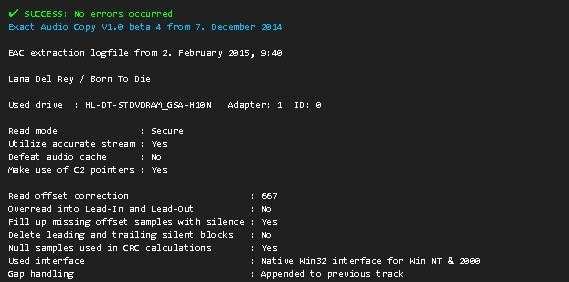
The SMP EAC Log Viewer is a Spider Monkey Panel (SMP) script for Foobar2000 designed to display Exact Audio Copy (EAC) log files in a DUI panel. It preserves the alignment of log columns, color-codes the conclusion lines for quick success/error identification, and prepends a summary line so it scrolls with the rest of the log.

Features:

  • DUI panel
  • Monospace font: Preserves column alignment in all EAC logs.
  • Color-coded conclusions:
    • Green = successful rip
    • Red = errors found
  • Summary line: Displays overall pass/fail and scrolls with the log.
  • Automatic log detection: Checks multiple common naming conventions:
    • %album%.log
    • %artist% - %album%.log
    • EAC.log

Installation:

  1. Download the script
    Get the latest version of the SMP script from the GitHub repository:
    github.com/tom2tec/foobar2000_smp_eac_log_viewer/releases
  2. Copy the script
    Copy and paste the eac_log_viewer_panel.js script into your preferred scripts folder. Typical choices:
    • C:\Users\<YourName>\Documents\Foobar\scripts
    • Or any folder you already use for SMP scripts.
  3. Add a Spider Monkey Panel
    • Open Foobar2000 and switch to your DUI layout.
    • Right-click → Add New UI Element → Spider Monkey Panel
    • Open the Edit Panel Script… pane and paste the contents of eac_log_viewer_panel.js. or point to the script’s location in Panel Properties → Script File → File.
  4. Adjust panel settings
    • Set the font to match your DUI theme (monospace).
    • Resize the panel to comfortably display the full log width.

Usage:

  • The panel automatically updates when:
    • You play a new track.
    • You change focus in the playlist.
  • Scroll through the log using your mouse wheel.
  • The summary line shows the overall rip status and scrolls with the text.
  • Color-coded lines highlight conclusions: green for success, red for errors.

Notes:

  • The script is optimized for one log per album, but will attempt all three naming conventions for flexibility.
  • Unusually named logs may require manual renaming in order to conform or add an input condition to the script.
  • DUI theming preserves font and panel appearance but maintains column alignment.

License

This project is licensed under the MIT License. See the included LICENSE file or the GitHub repository for details.

Download and Support

foo_monthly_stats ~ Foobar Visualizes Music Stats


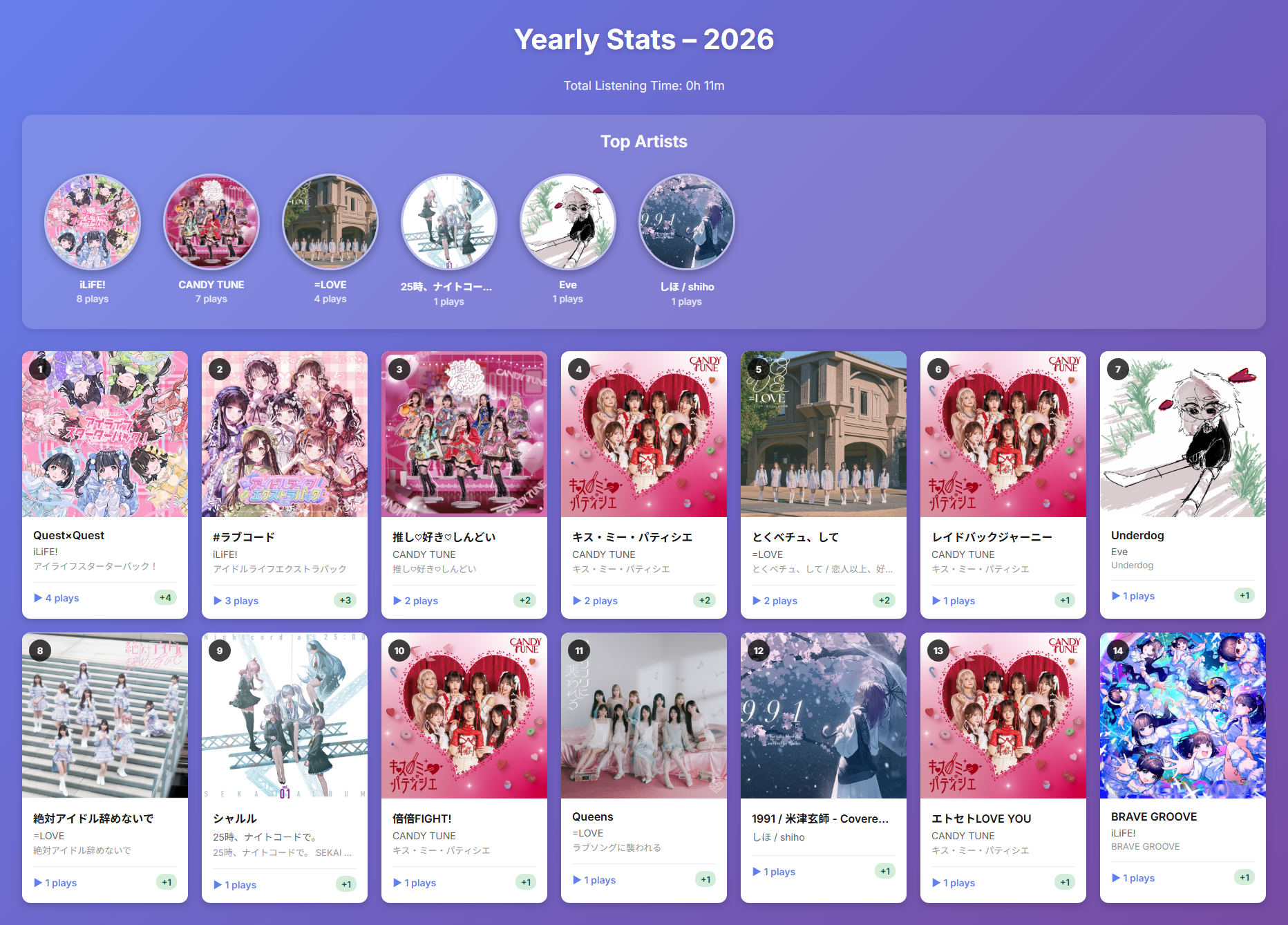
A foobar2000 component that tracks and visualizes your music listening statistics on a monthly and yearly basis.

Features:

  • 📊 Monthly & Yearly Statistics: View your listening history organized by month or year
  • 🎵 Track Play Counts: Records the number of times each track is played with accurate playback time tracking
  • 📈 Month-over-Month Comparison: See how your listening habits change with delta indicators
  • 🎨 Beautiful HTML Reports: Export visually appealing reports with album artwork
  • 🏆 Top Artists Ranking: Highlights your most-played artists with circular album art
  • ⏱️ Total Listening Time: Calculates and displays your total listening time
  • 🗄️ SQLite Database: Efficient local storage of listening history
  • 🖼️ Album Art Integration: Displays album artwork in reports using embedded thumbnails
foo_monthly_stats panel

github.com/shirafukayayoi/foo_monthly_stats

Foobar2000 ~ Album Based Beats Per Minute


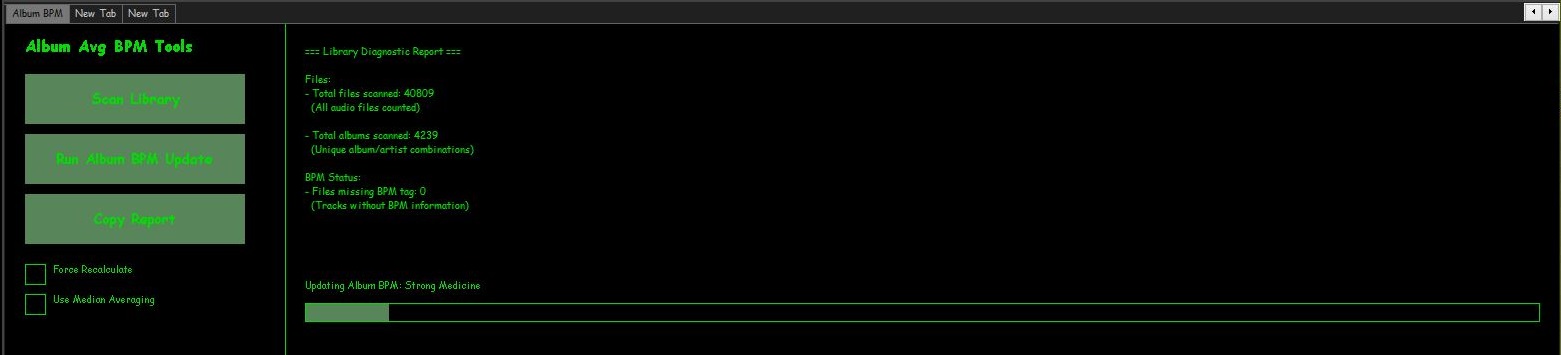
Beats Per minute is great for playlist of songs sorted by BPM but it would be useful to sort albums by BPM as well. To do this the following script calculates an average of BPM information from each song of the album and write that value to ALBUM_AVG_BPM. Then just create a playlist sorted by artist then album_avg_bpm

SMP Album Average BPM Calculator Script

In the DUI, toggle layout and create a new panel or tab, then right click the new area and add a New UI Element, scroll down to the Utility section and select Spider Monkey Panel and click OK. Now right click the new Spider Monkey Panel and select Edit Panel Script. Select the entire contents on the new ‘Temporary File’ window and replace them with the following script.

Show full script

'use strict';

/*
====================================================
Album Average BPM Panel - FULL PRO v5
- Immediate feedback for buttons
- Status line in report section
- Progress bars appear immediately
- Logs skipped files
- Inconsistent albums listed
====================================================
*/

function RGB(r,g,b){ return (0xff000000 | (r<<16) | (g<<8) | b); }

////////////////////////////////////////////////////
// TitleFormats
////////////////////////////////////////////////////
const tf_album = fb.TitleFormat("%album%");
const tf_albumArtist = fb.TitleFormat("%album artist%");
const tf_artist = fb.TitleFormat("%artist%");
const tf_bpm = fb.TitleFormat("%bpm%");
const tf_existing = fb.TitleFormat("%album_avg_bpm%");

////////////////////////////////////////////////////
// UI Colours + Font
////////////////////////////////////////////////////
function getUIColours(){
    try{
        return { bg: window.GetColourDUI(1), text: window.GetColourDUI(0), accent: window.GetColourDUI(2) };
    }catch(e){
        return { bg: RGB(30,30,30), text: RGB(255,255,255), accent: RGB(0,200,0) };
    }
}

function getUIFont(){ try{ return window.GetFontDUI(0); } catch(e){ return gdi.Font("Segoe UI",13,0); } }

////////////////////////////////////////////////////
// Library cache
////////////////////////////////////////////////////
let libHandles = null;
function loadLibraryOnce(){ if(!libHandles) libHandles = fb.GetLibraryItems(); }

////////////////////////////////////////////////////
// State
////////////////////////////////////////////////////
let runningUpdate=false;
let reporting=false;
let updateIndex=0, updateTimer=0;
let reportIndex=0, reportTimer=0;
let currentAlbum="Idle", currentFile="";
let updates=0;

let totalFiles=0, totalAlbums={};
let missingBPM=0, zeroBPM=0, missingAlbumAvg=0;
let minBPM=999999, maxBPM=0;
let albumConsistency={}, inconsistentAlbums=0;
let skippedFiles=[];

let forceRecalc=false, useMedian=false;

////////////////////////////////////////////////////
// Layout
////////////////////////////////////////////////////
const LEFT_WIDTH = 280;
const buttonScan={x:20,y:50,w:220,h:50};
const buttonUpdate={x:20,y:110,w:220,h:50};
const buttonCopy={x:20,y:170,w:220,h:50};
const checkboxForce={x:20,y:240,size:20};
const checkboxMedian={x:20,y:270,size:20};

////////////////////////////////////////////////////
// Album BPM Update Logic
////////////////////////////////////////////////////
let albumsMap=[];

function buildAlbums(){
    loadLibraryOnce();
    albumsMap = [];
    let map={};

    for(let i=0;i400) continue; // Filter extreme BPMs

        let groupingArtist = albumArtist ? albumArtist : artist;
        let key = groupingArtist+"|||"+album;

        if(!map[key]){
            map[key]={ handles:new FbMetadbHandleList(), sum:0, count:0, hasExisting:true, existingValues:{} };
        }

        map[key].handles.Add(h);
        map[key].sum += bpm;
        map[key].count++;

        let albumAvg = tf_existing.EvalWithMetadb(h);
        if(albumAvg) map[key].existingValues[albumAvg]=true;

        if(!albumAvg) map[key].hasExisting=false;
    }

    albumsMap = Object.values(map);
}

function stopUpdateTimer(){ if(updateTimer){ window.ClearInterval(updateTimer); updateTimer=0; } }

function processUpdateNext(){
    if(!runningUpdate) return;

    if(updateIndex>=albumsMap.length){
        runningUpdate=false;
        stopUpdateTimer();
        currentAlbum="Finished";
        fb.ShowPopupMessage("Album BPM Update Finished. Updated Albums: "+updates);
        window.Repaint();
        return;
    }

    let data = albumsMap[updateIndex++];
    currentAlbum = tf_album.EvalWithMetadb(data.handles[0]);

    // Determine if update needed
    let inconsistent = Object.keys(data.existingValues).length > 1;
    if(!forceRecalc && !inconsistent) return;

    let avg=0;
    if(useMedian){
        let arr=[];
        for(let i=0;i<data.handles.Count;i++){
            let val=parseFloat(tf_bpm.EvalWithMetadb(data.handles[i]));
            if(!isNaN(val) && vala-b);
        let mid=Math.floor(arr.length/2);
        avg = arr.length%2===0 ? (arr[mid-1]+arr[mid])/2 : arr[mid];
    }else{
        avg = data.sum / data.count;
    }
    avg = avg.toFixed(2);

    let json=[];
    for(let i=0;i<data.handles.Count;i++){
        try{
            json.push({"ALBUM_AVG_BPM":avg});
        }catch(e){
            skippedFiles.push(data.handles[i].Path);
        }
    }

    try{
        data.handles.UpdateFileInfoFromJSON(JSON.stringify(json));
        updates++;
    }catch(e){
        for(let i=0;i0){
        currentAlbum = tf_album.EvalWithMetadb(albumsMap[0].handles[0]);
    }

    window.Repaint();
    updateTimer = window.SetInterval(processUpdateNext,100);
}

////////////////////////////////////////////////////
// Report Logic
////////////////////////////////////////////////////
let reportText="Press Scan Library.";

function stopReportTimer(){ if(reportTimer){ window.ClearInterval(reportTimer); reportTimer=0; } }

function processReportNext(){
    if(!reporting) return;
    let batch=500;

    for(let c=0;c<batch && reportIndex0){
                if(bpmmaxBPM) maxBPM=bpm;
            }
        }
        if(!albumAvg) missingAlbumAvg++;

        if(!albumConsistency[key]) albumConsistency[key]={};
        if(albumAvg) albumConsistency[key][albumAvg]=true;

        currentFile = groupingArtist+" - "+album;
    }

    if(reportIndex>=libHandles.Count){
        reporting=false;
        stopReportTimer();

        inconsistentAlbums=0;
        let inconsistentList=[];
        for(let k in albumConsistency){
            let vals=Object.keys(albumConsistency[k]);
            if(vals.length>1){
                inconsistentAlbums++;
                if(inconsistentList.length0?inconsistentList.join("\n"):"None"}

Skipped / Inaccessible Files:
${skippedFiles.length>0?skippedFiles.join("\n"):"None"}

Current Status: Idle

BPM Range:
- Lowest BPM found: ${minBPM===999999?"N/A":minBPM}
- Highest BPM found: ${maxBPM}`;
    }

    window.Repaint();
}

function startReport(){
    if(reporting) return;
    loadLibraryOnce();
    reportIndex=0;
    totalFiles=0; totalAlbums={};
    missingBPM=0; zeroBPM=0; missingAlbumAvg=0;
    minBPM=999999; maxBPM=0; albumConsistency={};
    skippedFiles=[];

    reporting=true;
    reportText="Scanning library...";

    // show first file immediately
    if(libHandles.Count>0){
        currentFile = tf_album.EvalWithMetadb(libHandles[0]) || "(No Album)";
    }

    window.Repaint();
    reportTimer = window.SetInterval(processReportNext,10);
}

////////////////////////////////////////////////////
// Drawing
////////////////////////////////////////////////////
function drawButton(gr,b,label,ui,font){
    gr.FillSolidRect(b.x,b.y,b.w,b.h,ui.accent);
    gr.DrawString(label,gdi.Font(font.Name,14,1),ui.text,b.x,b.y,b.w,b.h,0x11000000);
}

function drawCheckbox(gr,c,label,state,ui,font){
    gr.DrawRect(c.x,c.y,c.size,c.size,1,ui.text);
    if(state) gr.FillSolidRect(c.x+4,c.y+4,c.size-8,c.size-8,ui.accent);
    gr.DrawString(label,font,ui.text,c.x+28,c.y-2,300,24,0);
}

function on_paint(gr){
    let ui=getUIColours();
    let font=getUIFont();
    let titleFont=gdi.Font(font.Name,16,1);

    gr.FillSolidRect(0,0,window.Width,window.Height,ui.bg);

    // LEFT PANEL
    gr.DrawString("Album Avg BPM Tools",titleFont,ui.text,20,10,LEFT_WIDTH,30,0);
    drawButton(gr,buttonScan,"Scan Library",ui,font);
    drawButton(gr,buttonUpdate,"Run Album BPM Update",ui,font);
    drawButton(gr,buttonCopy,"Copy Report",ui,font);
    drawCheckbox(gr,checkboxForce,"Force Recalculate",forceRecalc,ui,font);
    drawCheckbox(gr,checkboxMedian,"Use Median Averaging",useMedian,ui,font);

    gr.DrawLine(LEFT_WIDTH,0,LEFT_WIDTH,window.Height,1,ui.text);

    // RIGHT PANEL - report text
    let statusText = reporting ? "Scanning: "+currentFile : runningUpdate ? "Updating Album BPM: "+currentAlbum : "Idle";
    let reportWithStatus = reportText.replace("Current Status: Idle","Current Status: "+statusText);

    gr.GdiDrawText(reportWithStatus,font,ui.text,
        LEFT_WIDTH+20,20,
        window.Width-(LEFT_WIDTH+40),
        window.Height-160,0); // leave 160px for progress bars

    // Progress bars
    const barHeight = 18;
    const margin = 8;
    const barYUpdate = window.Height - 2*barHeight - 2*margin;
    const barYScan   = window.Height - barHeight - margin;

    if(runningUpdate){
        let prog=Math.floor((updateIndex/albumsMap.length)*(window.Width-LEFT_WIDTH-40));
        gr.FillSolidRect(LEFT_WIDTH+20,barYUpdate,prog,barHeight,ui.accent);
        gr.DrawRect(LEFT_WIDTH+20,barYUpdate,window.Width-LEFT_WIDTH-40,barHeight,1,ui.text);
        gr.DrawString("Updating Album BPM: "+currentAlbum,font,ui.text,LEFT_WIDTH+20,barYUpdate-25,window.Width-LEFT_WIDTH-40,20,0);
    }

    if(reporting){
        let prog=Math.floor((reportIndex/libHandles.Count)*(window.Width-LEFT_WIDTH-40));
        gr.FillSolidRect(LEFT_WIDTH+20,barYScan,prog,barHeight,ui.accent);
        gr.DrawRect(LEFT_WIDTH+20,barYScan,window.Width-LEFT_WIDTH-40,barHeight,1,ui.text);
        gr.DrawString("Scanning: "+currentFile,font,ui.text,LEFT_WIDTH+20,barYScan-25,window.Width-LEFT_WIDTH-40,20,0);
    }
}

////////////////////////////////////////////////////
// Mouse
////////////////////////////////////////////////////
function on_mouse_lbtn_up(x,y){
    if(hit(buttonScan,x,y)) {
        startReport();
        reportText = "Scanning library...";
        currentFile = libHandles.Count>0 ? tf_album.EvalWithMetadb(libHandles[0]) || "(No Album)" : "Idle";
        window.Repaint();
    }
    if(hit(buttonUpdate,x,y)) {
        startUpdate();
        currentAlbum = albumsMap.length>0 ? tf_album.EvalWithMetadb(albumsMap[0].handles[0]) : "Preparing update...";
        window.Repaint();
    }
    if(hit(buttonCopy,x,y) && reportText){
        utils.SetClipboardText(reportText);
        fb.ShowPopupMessage("Report copied to clipboard.");
    }

    if(hitSquare(checkboxForce,x,y)){ forceRecalc=!forceRecalc; window.Repaint(); }
    if(hitSquare(checkboxMedian,x,y)){ useMedian=!useMedian; window.Repaint(); }
}

function hit(b,x,y){ return x>=b.x && x=b.y && y=c.x && x=c.y && y<=c.y+c.size; }

Album Avg BPM Tools Script

github.com/tom2tec/foobar2000-smp-album-average-bpm

Resources:

https://github.com/stengerh/foo_bpm
https://github.com/NotSimone/foo_cnn_bpm
https://github.com/tom2tec/foobar2000-smp-album-average-bpm

Foobar2000 ~ Library-Tree-SMP


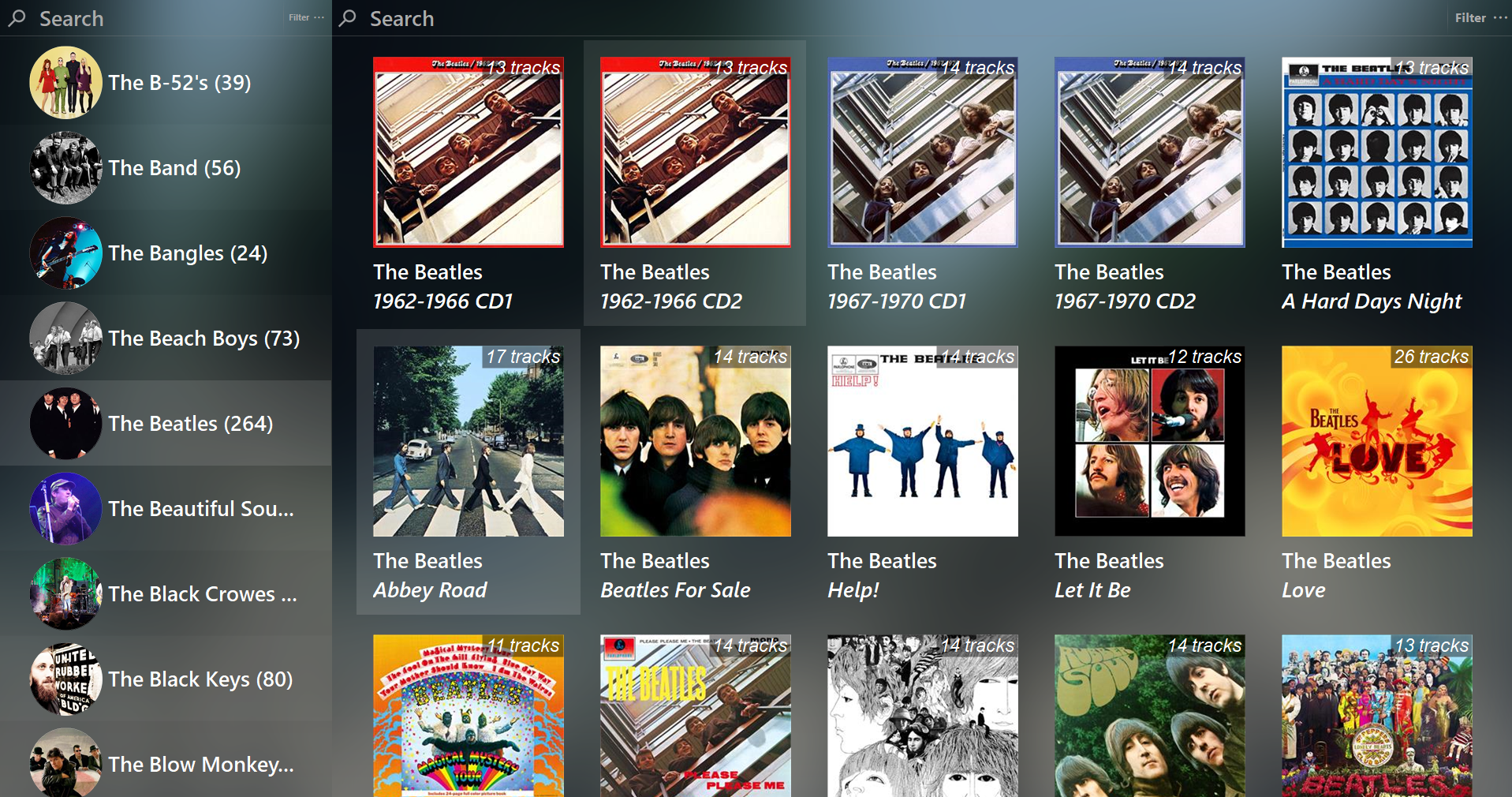
Feature rich library viewer and browser for foobar2000 and Spider Monkey Panel. Improved version of the original Library Tree, which tons of new features, performance optimizations and fixes.

Features:

  • Tree viewer
  • Album / Artist art browser + Flow mode
  • Single / Multiple panel modes + Facets
  • Statistics
  • Library and multi-playlists sources
  • Auto-DJ
  • Top Tracks
  • Duplicates handling and filtering
  • Mode presets
    • Browser: keep playing playlist
    • Player: play without a playlist
    • Default: choice of all actions

github.com/regorxxx/Library-Tree-SMP

Foobar2000 ~ Not-A-Waveform-Seekbar-SMP


Seekbar for foobar2000, using Spider Monkey and ffmpeg or audiowaveform. It’s based on RMS or peak levels, instead of the actual waveform.

Features:

  • Uses audiowaveform by default (included).
  • ffprobe can be used if desired. Download it and copy ffprobe.exe into ‘helpers-external\ffprobe’.
  • Visualizer mode to simply show an animation which changes according to BPM (if tag exists).
  • VU Meter mode by RMS or peak levels.
  • Fully configurable using the R. Click menu:
    • Colors
    • Waveform modes
    • Analysis modes
    • VU Meter
    • Animations
    • Multi-channel display
    • Refresh rate (not recommended anything below 100 ms except on really modern CPUs)

github.com/regorxxx/Not-A-Waveform-Seekbar-SMP

foo_scrobbler_mac ~ Foo Scrobbler For Macs


Foo Scrobbler (foo_scrobbler_mac) is a native Last.fm scrobbling plugin for foobar2000 on macOS. Submits tracks based on precise playback rules, caches scrobbles when offline, and operates silently after one-time authentication. Built using the official foobar2000 plugin API, it focuses on reliability, low overhead, and correct metadata handling. Fully open-source under GPLv3.

Supports macOS ≥ 11.5 on both Intel and ARM.

github.com/zfoxer/foo_scrobbler_mac

foo_truepeak ~ True Peak Scanner


foo_truepeak is a ITU-R BS.1770-5 compliant True Peak scanner. It can also scan ReplayGain, Loudness Range (LRA), Dynamic Range (DR), show the amount of clipping samples and report the position of highest peak.

www.foobar2000.org/components/view/foo_truepeak

For users primarily concerned with playback quality and simplicity, foo_truepeak can replace foobar2000’s ReplayGain and DR scanners. It uses modern loudness standards, detects true peaks and can write all relevant tags in a single pass. While its ReplayGain and DR values may not exactly match legacy scanners, they are more appropriate for real-world playback on modern systems.

1. Download and install foo_truepeak

  1. Download foo_truepeak.fb2k-component from the official component page.
  2. In foobar2000, open File → Preferences → Components.
  3. Click Install…, select the foo_truepeak.fb2k-component file.
  4. Restart foobar2000 when prompted.

2. Disabling legacy scanners (optional but recommended)

To avoid confusion or duplicate workflows:

  1. Don’t try removing the ReplayGain scanner as it’s built in.
  2. You can uninstall foo_dr_meter and or foo_dynamic_meter.

This keeps foo_truepeak as your single analysis tool.

3. Open foo_truepeak preferences

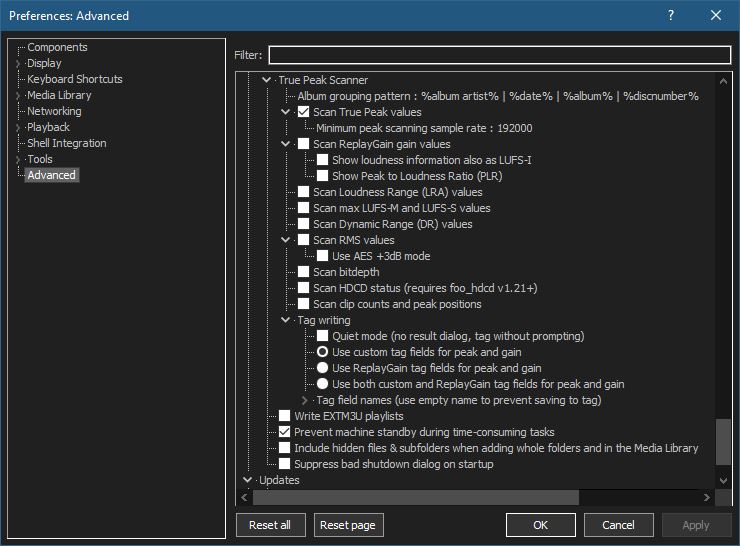
Go to File → Preferences → Advanced Tools → True Peak Scanner

4. Ensure the following is enabled

Scan True Peak Values

True peak scanning accounts for inter-sample peaks created during digital-to-analog conversion, ensuring that peak levels reflect what a real DAC actually outputs, not just what is stored in the file.

5. Enable ReplayGain scanning

Scan ReplayGain values

Notes:
  • Gains are derived from EBU R128 loudness, but written as ReplayGain tags.
  • Peaks are true peaks, not simple sample peaks.
  • Playback normalization works normally in foobar2000.

6. Enable Dynamic Range scanning

Scan Dynamic Range (DR) values

Notes:

  • These values are analytical, not official TT DR Meter values.
  • They are suitable for comparison within your library, not for DR Database submissions.

7. Choose tag writing behavior

Use ReplayGain tag fields for peak and gain

8. Run a True Peak scan

  1. Select a track, tracks or albums in a playlist.
  2. Right-click → True Peak Scan.

You can also create custom buttons on the toolbar for Album or Track scans.

Download True Peak Toolbar Button Icons

9. Verify tags at first

After scanning, check the file(s) to ensure tagging happened correctly:

  • Open Properties > ReplayGain
  • Confirm presence of values for:
    • Track Gain
    • Album Gain
    • Total Peak
    • Lowest gain (loudest track)
    • Highest gain (quietist track)

10. Use ReplayGain during playback

  1. Enable ReplayGain in Preferences → Playback → ReplayGain.
  2. Choose your preferred mode, Track or Album.

foobar2000 will now use modern loudness analysis and playback without intersample clipping.

Summary:

  • One scan
  • One pass
  • Peak safe playback
  • Modern loudness normalization

This setup is ideal for users who prioritize listening quality and ease of use over legacy metric compatibility.

References:

www.foobar2000.org/components/view/foo_truepeak
foobar.hyv.fi/?view=foo_truepeak
wiki.hydrogenaudio.org/Foobar2000:Components/True_Peak_Scanner
hydrogenaudio.org/index.php/topic,125719.0
en.wikipedia.org/wiki/Amplitude
en.wikipedia.org/wiki/Audio_normalization
en.wikipedia.org/wiki/Dynamic_range
en.wikipedia.org/wiki/ReplayGain

Alternative DSP
www.foobar2000.org/components/view/foo_dsp_replaygain

foo_audio_wizard ~ Full-track Analysis & Real-time Monitoring


Audio Wizard (foo_audio_wizard) is a fiery chapter of The Wizardium, granting foobar2000 audiophiles and engineers tools for full-track analysis and real-time monitoring. Harness Pure Dynamics for psychoacoustic clarity.

github.com/The-Wizardium/Audio-Wizard

foo_ui_wizard ~ User Interface Wizard


Sealed within the luminous Sapphiraz Sanctum, where ethereal interfaces shimmer in eternal twilight, the UI Wizard is a spellbinding chapter of The Wizardium’s grimoire. Its runic seal, the radiant ᛋ Sowilo, yields only to masters of window enchantment, reshaping foobar2000’s form with mischievous elegance — from glass-like Aero effects to borderless designs that defy mortal UI constraints.

  • Window Appearance Customization:
    • Supports multiple frame styles: Default, Small Caption, No Caption, No Border.
    • Configurable Aero effects: Default, Disabled, Glass Frame, Sheet of Glass.
    • Customizable window background color and transparency.
    • Optional custom window title and icon.
    • Configurable window shadow for borderless styles.
  • Window Behavior Control:
    • Adjustable window positioning and sizing with constraints (min/max width and height).
    • Customizable caption area for dragging with various move styles (e.g., mouse buttons, key combinations).
    • Snap-to-edge functionality with configurable snap and unsnap distances.
    • ESC key actions: None, Hide, or Exit.
    • Inactivity-based window hiding with customizable timeout.
  • Window State Management:
    • Toggle between Normal, Maximized, and Fullscreen states.
    • Option to disable window maximizing or resizing.
    • Automatic saving and loading of window position and size.
  • API: COM/ActiveX interface for scripting in foobar2000 via Spider Monkey Panel or JSplitter.
Foobar2000 > Preferences: UI Wizard Menu

www.the-wizardium.org
github.com/The-Wizardium/UI-Wizard

Foobar2000 ~ Album & Artist Artwork


Foobar2000 displays artwork in a panel which can be added and configured to suit your preferences. The artwork panel displays the image file associated with an audio track. If the standard options are insufficient, Foobar’s image handling can be extended via additional components.

To add an artwork panel to the default user interface (DUI), Enable Layout Editing Mode from the menu View > Layout. Add the Album Art Viewer from the Selection Information section.

Context Menu (Right Mouse Button On Artwork Panel)
Selecting the Album Art Viewer on the Add New UI Element menu

Album Art Viewer (built-in)

Sources:

  • Embedded tags (front, back, disc, artist, etc.)
  • External image files (folder.jpg, cover.png, etc.)

Notes:

  • Supports multiple artwork types.
  • Very stable, but basic (no advanced layout or scripting).
  • Artist art is only shown if tagged or present as files.
Foobar2000 Artwork Display Context Submenu

Context Menu

Display Components (Artwork panels)

foo_ui_columns (Columns UI)

Displays: Album & artist art
Sources: Embedded tags and external files

Notes:

  • Legacy but still widely used.
  • Artwork panels are static (no scripting).
  • No longer actively developed, but stable.

Resources: