Splitting A Single Album File Into Tracks


Convert an album from a single media file with a .cue file to individual tracks instead.

Option 1: foobar2000 (easy, very reliable)

If you already use foobar2000, this is usually the best choice.

Steps

  1. Open foobar2000
  2. Drag either the .cue file or the .flac file into foobar
    • If the CUE is correct, you’ll see the album broken into tracks.
  3. Select all the tracks
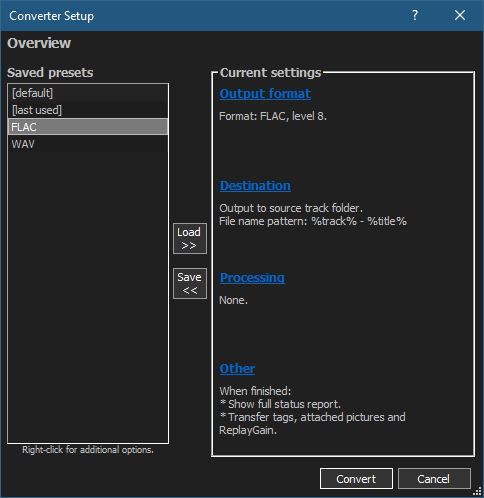
  4. Right-click → Convert → …
  5. Choose:
    • Output format: FLAC
    • Processing: none needed
  6. Click Destination
    • Output path: your album folder
    • File name pattern (example): %tracknumber% - %title%
  7. Convert

Result

  • Individual FLAC tracks
  • No quality loss (bit-perfect split)
  • Metadata pulled from the CUE

💡 Note: If the cue has gaps or pre-emphasis flags, foobar2000 handles them correctly.

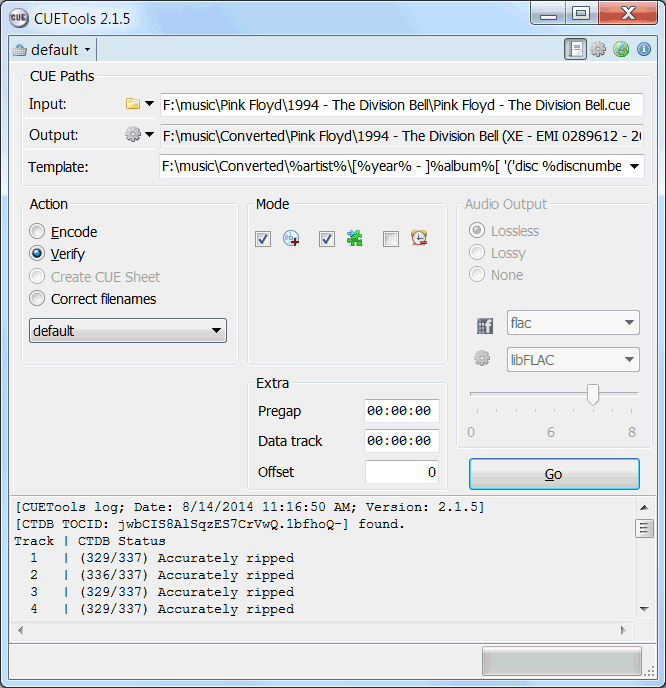
Option 2: CUETools (best for archival accuracy)

If you care about log verification, AccurateRip, or preserving exact offsets, this is the gold standard.

Steps

  1. Download CUETools
  2. Open it and load the .cue file
  3. Set:
    • Action: Encode
    • Audio Output: FLAC
    • Mode: Tracks
  4. Start

Result

  • Sample-accurate track splits
  • Excellent for archival rips
  • Strong metadata handling

This is especially good if the album originated from a CD rip.


Option 3: FLAC + shntool (command line, Linux-friendly)

If you’re on Linux, shntool works well.

Example

shnsplit -f album.cue -o flac album.flac

Then tag the files:

cuetag album.cue *.flac

Result

  • Clean, lossless splits
  • Metadata from CUE applied
  • More manual, but very transparent

Option 4: MusicBrainz Picard (semi-automatic)

Useful if:

  • The CUE has weak or missing metadata
  • You want MusicBrainz tags

Workflow:

  • Load the CUE
  • Let Picard identify the release
  • Use Tools → Split files

Not as precise as foobar or CUETools for offsets, but fine for most albums.

split2flac ~ POSIX FLAC Splitter


split2flac splits one big APE/FLAC/TTA/WV/WAV audio image (or a collection of such files, recursively) with CUE sheet into FLAC/M4A/MP3/OGG_VORBIS/OPUS/WAV tracks with tagging, renaming, charset conversion of cue sheet, album cover images. It also uses configuration file, so no need to pass a lot of arguments every time, only an input file. Should work in any POSIX-compliant shell.

https://github.com/ftrvxmtrx/split2flac

EAC & CTDB ~ Verify Your Rips


This plugin verifies your rips against CTDB database, and submits new CDs to it.

It can also serve as a metadata plugin, providing access to MusicBrainz, Discogs and FreeDB metadata via CTDB. CTDB replicates Musicbrainz database hourly, Discogs and FreeDB – monthly. In addition to direct discid search, it supports the same fuzzy search algorithm as Musicbrainz, and also uses it for Discogs and FreeDB data, increasing the chance that correct metadata will be found.

EACCTDB

cue.tools/wiki/CTDB_EAC_Plugin
db.cue.tools/ui/ (Database Interface)

CUETools ~ CUE File Utility & Transcoder


CUETools is a tool for lossless audio/CUE sheet format conversion. The goal is to make sure the entire album image is preserved accurately. A lossless disc image must be lossless not only in preserving contents of the audio tracks, but also in preserving gaps and CUE sheet contents. Many applications lose vital information upon conversion, and don’t support all possible CUE sheet styles. For example, foobar2000 loses disc pre-gap information when converting an album image, and doesn’t support gaps appended (noncompliant) CUE sheets.

CUETools215

cue.tools/wiki/Main_Page
cue.tools/wiki/CUETools
cue.tools/wiki/CUETools_Download
cue.tools/wiki/Category:CUETools_Guides
hydrogenaud.io/index.php?board=74.0

CUERipper ~ Open Source PC CD Ripper


CUERipper is an utility for extracting digital audio from CDs, and an open-source alternative to EAC. It has a lot fewer configuration options, so it’s somewhat easier to use, and is included in the CUETools package.

Supports AccurateRip, CTDB, freeDB and MusicBrainz

cuetools.net/wiki/CUERipper
cuetools.net/wiki/CUETools_Download
cuetools.net/wiki/Category:CUERipper_Guides
www.hydrogenaud.io/forums/index.php?showtopic=66233

CUETools ~ Lossless Audio / CUE Sheet Conversion


The goal is to make sure the album image is preserved accurately. A lossless disc image must be lossless not only in preserving contents of the audio tracks, but also in preserving gaps and CUE sheet contents. Many applications lose vital information upon conversion, and don’t support all possible CUE sheet styles.

Supports AccurateRip

cuetools.net
Download
CueTools Database

AccurateRip ~ Accurate Digital Audio Extraction


AccurateRip™ furthers audio CD ripping by verifying ripped tracks against an Internet database, making sure they are error free.

www.accuraterip.com

Software supported:

Resources:

de.wikipedia.org/wiki/AccurateRip