SOX-DSD ~ SoX With DSD For Windows.


Here located unofficial builds of the SoX (Sound eXchange) audio tool with DSD support and other patches (including both DSF & DFF I/O and SDM sox “effect” to convert from PCM to DSD) for OS Windows only. Provided two Windows executable files for 32 & 64 bit systems. Binaries were cross-compiled on Linux using MinGW/gcc on fully static way.

  •  DSF I/O
  •  DFF I/O
  •  SDM effect to convert from PCM to DSD
github.com/turbulentie/sox-dsd-win

BirdNET-Go ~ Realtime BirdNET Soundscape Analyzer


BirdNET-Go is an AI solution for continuous avian monitoring and identification

  • 24/7 realtime bird song analysis of soundcard capture, analysis output to log file, SQLite or MySQL
  • Utilizes BirdNET AI model trained with more than 6500 bird species
  • Local processing, Internet connectivity not required
  • Easy to use Web user interface for data visualisation
  • BirdWeather.com API integration
  • Realtime log file output can be used as overlay in OBS for bird feeder streams etc.
  • Minimal runtime dependencies, BirdNET Tensorflow Lite model is embedded in compiled binary
  • Runs on Windows, Linux and macOS
  • Low resource usage, works on Raspberry Pi 3 and equivalent 64-bit single board computers

github.com/tphakala/birdnet-go

NSMusicS ~ Modular Multiplatform Player


The NSMusicS plan is a multi-modal smart music software based on Electron and WPF, supporting multiple platforms.

  • Windows Professional MusicPlayer++
  • Tens of millions – song level of Music Library Management on NAS
  • Music and Entertainment Scenes (Recording karaoke and scoring…)
  • Windows Music IDE, similar to Adobe Audition:
    1. Identify songs module based on sound fingerprint technology (also open sourced as a separate project model)
    2. Guessing Your Favorite Module Based on Big Data User Behavior Analysis
    3. AI singing module based on NLP, replacing the sound of the song with your own (also open sourced as a separate project model)
    4. AI music notation module based on NLP (also open sourced as a separate project model)
    5. AI extraction of audio lyrics synchronization information based on nlp (breaking copyright barriers such as Krc and Qrc)
    6. Implement functions such as NSMusicS singing bar scoring and evaluation

github.com/Super-Badmen-Viper/NSMusicS

Halcyon ~ Minimalistic Music Player


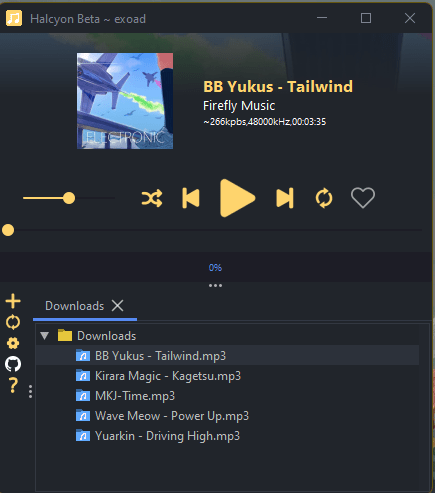
This is a minimalistic Music Player written in Java & native C++. The engine framework is written mainly in Java with C++ used to back any other
native functionalities.

Currently this project is under heavy development and not for general consumer usage.

Features:

  • audio
  • music-player
  • audio-player
  • minimalistic-music-player

sourceforge.net/projects/halcyon4j

March 2004

Integra Live ~ Simple Interactive Audio


Interactive audio made simple.

integra.io
sourceforge.net/projects/integralive
en.wikipedia.org/wiki/Integra_Live

FlexASIO ~ Flexible Universal ASIO Driver


FlexASIO is a universal ASIO driver, meaning that it is not tied to specific audio hardware. Other examples of universal ASIO drivers include ASIO4ALL, ASIO2KS, ASIO2WASAPI.

Universal ASIO drivers use hardware-agnostic audio interfaces provided by the operating system to produce and consume sound. The typical use case for such a driver is to make ASIO usable with audio hardware that doesn’t come with its own ASIO drivers, or where the bundled ASIO drivers don’t provide the desired functionality.

While ASIO4ALL and ASIO2KS use a low-level Windows audio API known as Kernel Streaming (also called “DirectKS”, “WDM-KS”) to operate, and ASIO2WASAPI uses WASAPI (in exclusive mode only), FlexASIO differentiates itself by using an intermediate library called PortAudio that itself supports a large number of operating system sound APIs, which includes Kernel Streaming and WASAPI (in shared and exclusive mode), but also the more mundane APIs MME and DirectSound. Thus FlexASIO can be used to interface with any sound API available on a Windows system. For more information, see the backends documentation.

Among other things, this makes it possible to emulate a typical Windows application that opens an audio device in shared mode. This means other applications can use the same audio devices at the same time, with the Windows audio engine mixing the various audio streams. Other universal ASIO drivers do not offer this functionality as they always open audio devices in exclusive mode.

github.com/dechamps/FlexASIO

MusicSync ~ Synchronize Music Libraries


MusicSync is a cross-platform tool that synchronizes your music library between devices and drives with advanced settings.

You can use it through CLI, that makes easy to sync you library with only a click using a script, or through GUI, that is more user-friendly. Here there are two examples:

python musicsync D:/Music sdcard/Music --adb --min-rating 4.5 --output-format opus --output-bitrate 128k
python musicsync D:/Music sdcard/Music --adb --min-rating 3 --min-year 2020 --output-format opus --output-bitrate

github.com/serpest/MusicSync
hydrogenaud.io/index.php?topic=121169.0

Windows Media Player Plus ~ Enhance WMP


Windows Media Player Plus! is a free plug-in for Windows Media Player that adds various user interface and playback enhancements.

Features:

  • Tag Editor Plus: an alternative for Windows Media Player’s Advanced Tag Editor (screenshot). Tag Editor Plus works on Windows Media Player 12 too, where the original Advanced Tag Editor has been removed.
  • Global hotkeys, allowing you to control Windows Media Player from within any running application.
  • Party Shuffle: a dynamic playlist that automatically gets filled with randomly picked songs. Of course, you can still add songs yourself, and reorder/remove songs, just like with a normal playlist. Very useful while throwing a party, as a DJ aid, or just for casual listening.
  • Real ‘find as you type’ in the media library: you can simply start typing to search, without having to click on the Search field first.
  • Disc number (‘set’) support in the media library: shows disc numbers in the Track number column and makes Windows Media Player use the disc numbers for sorting the tracks of an album (screenshot).
  • Access the standard Explorer right-click menu of a media file directly from within Windows Media Player (screenshot).
  • Restore last active playlist, media item, and playback position at Windows Media Player startup.
  • Show currently playing media in Windows Media Player’s title bar (screenshot).
  • Advanced playback options: Stop after current and Close after current, to automatically stop playback or close Windows Media Player when the current media has ended (screenshot).
  • Let Windows Media Player play/pause when you press the space bar.
  • Disable group headers in the Library Pane (screenshot).
  • Enhanced and configurable replacement of the Windows Live Messenger Music plug-in (What I’m Listening To) (screenshot).
  • Show currently playing media in Skype’s mood message.
  • Access the properties/settings of any Windows Media Player plug-in from within the main menu (Tools – Plug-in properties), without having to go to Options first (screenshot).
  • Bring back the “Find in library” right-click option of older versions of Windows Media Player to Windows Media Player 12.
  • “Play next” option when right-clicking a media item in Windows Media Player 11’s library (Windows Media Player 12 already has this by default).
  • Quickly re-enable all plug-ins after a Windows Media Player crash (screenshot).

Windows Media Player Plus! supports Windows Media Player 12 on all recent releases of Windows.

bmproductions.fixnum.org/wmpplus

GMetronome ~ Gnome Metronome


A free software metronome and tempo measurement tool for composers and musicians.

gitlab.gnome.org/dqpb/gmetronome

audiovolumesyncer ~ Sync Output Device Volumes


Use this application to sync the volume of several audio playback devices.

sourceforge.net/projects/audiovolumesyncer

AmiModRadio ~ Aminet Access & Amiga MOD Player


A program to automatically download, extract, and play modules from Aminet.

Did you know that, as of today (2015/06/02), there are more than 20,000 packages in the mods directory on Aminet? Yes! That’s more than 20,000 modules to play and enjoy! So, why not have a program that could automatically download one module at-a-time, extract it, and play it? This is the purpose of AmiModRadio.

Essentially, after starting MultiPlayer or HippoPlayer (only at this time), AmiModRadio connects to the player via ARexx and Aminet via FTP, then it downloads randomly a LHA file in the mods directories, extracts its content, and asks the player to play it. 🙂

Features:

  • Connects by FTP to Aminet
  • Uses XAD library to unarchive files containing modules
  • Uses ARexx to request players to play modules
  • Supports MultiPlayer and HippoPlayer
https://sourceforge.net/projects/amimodradio/

aminet.net/package/mus/play/AmiModRadio
aminet.net/tree?path=mods
en.wikipedia.org/wiki/Aminet

WMPCDText ~ Windows Media Player CD-Text Plugin


CD-Text is an extension of the audio CD standard that allows you to store additional information on an audio CD, such as album name, album artist and track info. Many audio players like Winamp and RealPlayer can read CD-Text but Windows Media Player has never supported it. Until now, because the WMPCDText plug-in allows Windows Media Player to read CD-Text.

WMPCDText provides an option to automatically read CD-Text from unrecognized audio CDs. Alternatively, you can right-click on a CD track in Windows Media Player’s Now Playing mode while a CD is playing, and select Read CD-Text.

WMPCDText especially comes in handy when using Windows Media Player for playing home-made audio CDs. Before WMPCDText, you would have to insert all the track information of such a CD manually into Windows Media Player. Now, just make sure that the CD-Text information is burned onto the CD, play the burned CD with Windows Media Player, and WMPCDText will automatically read the track information from the CD itself and insert it into the Media Library.

bmproductions.fixnum.org/moreprogs/wmpcdtext