This is an utility for batch extraction of individual tracks from .CUE/.WAV audio disk images, which for instance, are created by Exact Audio Copy software.
While PC users still have other methods of playing tracks from CUE files (by e.g. using Foobar2000, or mounting the image via Daemon Tools), Mac OS X users’ choice is limited, so therefore this utility was written.
The utility is built using Trolltech/Nokia Qt, and those, who would like to rebuild it from the source code – will require this library.
This software is in a public domain and thus can be used or modified for any purpose.
Tag Archives: utility
RTL Utility ~ Measure Round Trip Latency
RTL Utility is a tool for measuring the Round Trip Latency of your Digital Audio Workstation (DAW) and audio interface. The utility is used for low latency performance testing by system builders, reviewers, device manufacturers and at dawbench.com.
When your DAW sends data to your audio interface for playback, it doesn’t send a continuous stream of data one bit at a time. What it does is fill up a section of RAM called a buffer and sends that in a single message when it is ready. Before sending the next message it has to fill the buffer again. This wait time introduces a latency, or delay, between something happening in your DAW and when you actually hear it.
While you are recording, the audio interface buffers and sends data to your DAW in a similar fashion. This introduces latency into your recordings.
If you send a signal from your DAW, out through the audio interface and back in via a loopback patch, then there will be a round trip latency which is the sum of the output and input delays. This is the RTL.
TidyMP3 ~ Metadata Removal Tool
This tool removes every kind of trash from your mp3-files. It searches for valid mp3 audiodata-frames and removes everything else. This has the big advantage that it will also remove tags which are in the middle of the file (as is the case with joined tracks) as well as broken frames (half-downloads) and malicious tags (Tag-buffer-overflow bug in WinAMP and Windows XP). Use this tool to cleanup your mp3 files before you add your own tag. No more double tags, or annoying ‘Lyrics’ data containing group names or misspelled song names.
cuemaster.org/tidymp3
MusicSync ~ Synchronize Music Libraries
MusicSync is a cross-platform tool that synchronizes your music library between devices and drives with advanced settings.
You can use it through CLI, that makes easy to sync you library with only a click using a script, or through GUI, that is more user-friendly. Here there are two examples:
python musicsync D:/Music sdcard/Music --adb --min-rating 4.5 --output-format opus --output-bitrate 128k python musicsync D:/Music sdcard/Music --adb --min-rating 3 --min-year 2020 --output-format opus --output-bitrate

github.com/serpest/MusicSync
hydrogenaud.io/index.php?topic=121169.0
audiovolumesyncer ~ Sync Output Device Volumes
Use this application to sync the volume of several audio playback devices.
sourceforge.net/projects/audiovolumesyncer
CueListTool ~ Swiss Army Knife For Cue Lists & Cue Sheets
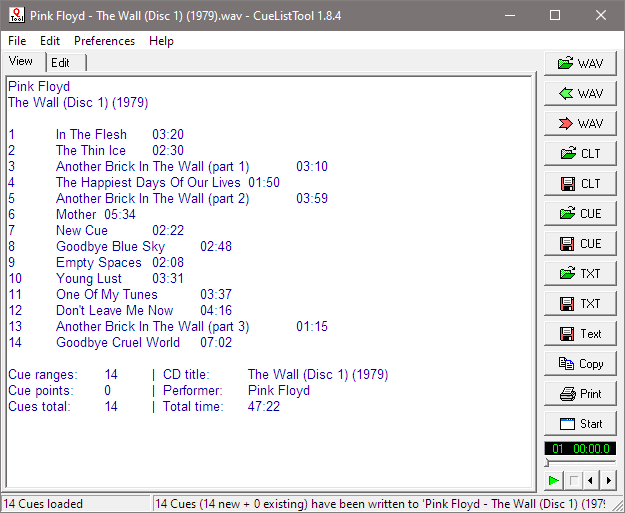
This utility allows you, among other things, to read, edit, and write back the cue lists embedded in WAV files by audio editing programs such as Adobe Audition. Cue lists can be saved as small text files and shared with other users.
www.stefanbion.de/cuelisttool

Axone.jar ~ mp3 Examination
Axone.jar is a utility allowing you to view all the information available in an MP3 file. This is not to be misunderstood: all the possible information. In the tag version 2 (ID3V2), the information is subdivided into frames and there are many more frames declared than frames actually displayed by MP3 players. Well Axone.jar knows how to display them all, without exceptions and whatever the version!
- Very classic frames such as title, album, artist, year, genre, track and comment.
- Other frames displayed by only some MP3 players.
- the image(s).
- the composer.
- the text of the song.
- volume control (itunes)
- The frames that are hidden from you (not necessarily with bad intentions).
- private frames (MusicMatch).
- encapsulated objects (RealJukebox).
- abusive comments (iTunes, Mediaplayer, MusicMatch, SoundJam).
- identification of coding software (LAME, iTunes)
- the identification of the original CD (LAME)
- internet links (MusicMatch)
- Undeclared frames, not understood and therefore clearly hidden from all MP3 players.
- The other frames usually not used.
Other data
The Lyrics and TAG+ tags, which are completely obsolete, may remain forgotten in certain files. If they are present, Axone.jar displays them.
When the software reads an MP3 file to display the current tag, it does a summary check of the audio data. It gives you the classic information on bitrate, sampling frequency, duration, etc.; but also if it finds excess or erroneous data. Excess data can be a sign of corrupted audio data, or of data intentionally hidden if the file was purchased on a merchant site (or if you did P2P). At this level, it is important to understand that the audio decoder is robust in the sense that data that is incomprehensible to it is simply skipped. It is therefore very easy to hide data between audio data, without risking disturbing MP3 players.
flying.guy.chez-alice.fr/Axone
LosslessSwitcher ~ Mac Sample Rate Utility
LosslessSwitcher switches your current audio device’s sample rate to match the currently playing lossless song on your Apple Music app, automatically.
Let’s say if the next song that you are playing, is a Hi-Res Lossless track with a sample rate of 192kHz, LosslessSwitcher will switch your device to that sample rate as soon as possible.
The opposite happens, when the next track happens to have a lower sample rate.
github.com/vincentneo/LosslessSwitcher
metamp3 ~ mp3 Command Line Utility
I wrote this because I wanted a command line tool that could
add album art to (and save from) mp3 files, compute replaygain
and save them as ID3 tags (readable by Winamp, etc).Features:
- Write (all) Text, URL and Picture frame tags, with description.
- Compute replay-gain values and set them as ID3v2.3 tags.
- Apply and Undo volume gain (as mp3gain).
- Extract pictures from mp3 files.
- Inspect ID3 v1.1, v2.3, and v2.4 tags.
- Inspect detailed info on mp3 files, including lametag data.
hydrogenaud.io/index.php/topic,49751.0
www.flumps.org/mp3z/tagging/metamp3.exe
Quiet on the Set ~ Windows Volume Limiter
Prevent someone from turning up the volume on a Windows machine beyond a maximum volume.
This is a very simple Windows Forms application that lets you set a maximum value on for your volume, and then lock the setting so that a user cannot change the volume.
Disclaimer: This app is primarily geared toward young/special needs children. The “lock” provides a basic level of control, but it could be easily bypassed by someone with technical knowledge.

MKVToolNix ~ Matroska Tools For Linux / Unix & Windows
With these tools one can get information about (via mkvinfo) Matroska files, extract tracks/data from (via mkvextract) Matroska files and create (via mkvmerge) Matroska files from other media files. Matroska is a new multimedia file format aiming to become THE new container format for the future. You can find more information about it and its underlying technology, the Extensible Binary Meta Language (EBML), at www.matroska.org
Rathole Media Archiver ~ Lossless Compression Utility
EdgeSounds’ RatHole (former GenieSys RatHole) is a free unique nondestructive universal compression utility. Its function is based on a principle of self-training neural networks. EdgeSounds RatHole was especially designed for nondestructive compression of any files containing audio data in PCM 8/16/24 bit or IEEE_FLOAT 32 bit format.
A new EdgeSounds compression algorithm makes it possible to efficiently reduce the size of packed audio data and later unpack exactly same bits, with no difference to the original data. The compression algorithm compresses audio data, considering the bit depth of the digital data contained in the audio file (8/16/24/32 bit). The algorithm is proven to be equally effective on compressing the following file types:
- Audio files WAV, AU, AIFF, SND;
- Ensoniq Paris PAS;
- Sample sound banks such as:
- AVM Apex bank file APEX
- Aureal sound bank ARL
- Creative Labs/E-mu System SoundFont banks format 1&2.x SBK, SF2;
- Downloadable sounds level 1&2 DLS;
- Ensoniq EPS Files EFE, Ensoniq Instruments family files INS, Ensoniq Disk Image GKH;
- Gravis Ultrasound /Forte Patch PAT;
- Kurzweil 2000-2600 files KRZ;
- Nemesys/Tascam GIG;
- Seer Systems Reality banks SEERBANKSET;
- Turtle Beach WaveFront Bank WFB;
- Virtual Sampler bank VSB;
- Multi-track audio data as Cakewalk/Sonar BUN, CWB;
- Impulse Tracker instrument ITI, Fast Tracker 2 instrument XI;
- any other formats containing audio data
The compression ratio of the algorithm depends on the size of audio data, the balance between the tone and noise component, bit depth and other factors, and usually varies from 36% to 78% or even more, with an average of 48-56%. The higher is the bit depth and the fidelity of audio data, the better is the compression ratio.
The RatHole can be successfully used as a common archiving utility for any other file types as well.
www.edgesounds.com/Products/Software/RatHole
www.rarewares.org/others.php#edgesounds-rathole