Playlist Management ~ Exporters & Parsers


Playlist Management: Export, Backup and Sync Your Music Playlists

Music playlists are increasingly tied to individual streaming services. A handful of open-source tools take different approaches to getting that information out, backing it up, or keeping playlists synchronized.

Playlist Out is a playlist parser and exporter aimed primarily at Chinese music services including QQ Music, NetEase Cloud Music, Kugou and Soda Music. It can turn playlists into TXT, CSV, Excel or JSON files. It is useful when the goal is simply to extract and preserve playlist information rather than move the playlist between services.

Exportify CLI takes a similar approach for Spotify, but is particularly useful for structured music-library work. It exports playlists to CSV or JSON and can include Spotify identifiers plus ISRC and album UPC, making the resulting data useful for further processing and metadata matching.

Playlist Exporter is a browser-based exporter for Spotify and Apple Music. It produces CSV or JSPF (JSON Shareable Playlist Format), or copies playlist data as JSON. Processing takes place locally in the browser, so it is primarily an export/interchange tool rather than a synchronization system.

SongMirror goes a step further. It connects Spotify, TIDAL, Qobuz, Deezer, Amazon Music, Apple Music and YouTube Music and can synchronize playlists between them. It uses identifiers such as ISRC for track matching and can operate as a one-way, multi-service or bidirectional synchronization system.

These applications therefore occupy different parts of the same playlist-management picture:

Playlist Out → extract
Exportify CLI / Playlist Exporter → export and preserve
SongMirror → match, transfer and synchronize

The exported files also provide a useful bridge to other music-library software. CSV and JSON can be processed by scripts and databases, while standardized playlist formats such as JSPF can provide an interchange layer between applications.

For anyone maintaining a long-term music collection, playlist export is more than a convenience: it provides a way to preserve playlists independently of the service that originally created them.

Easy Audio Sync ~ Syncing & Conversion Utility


Audio library syncing and conversion utility

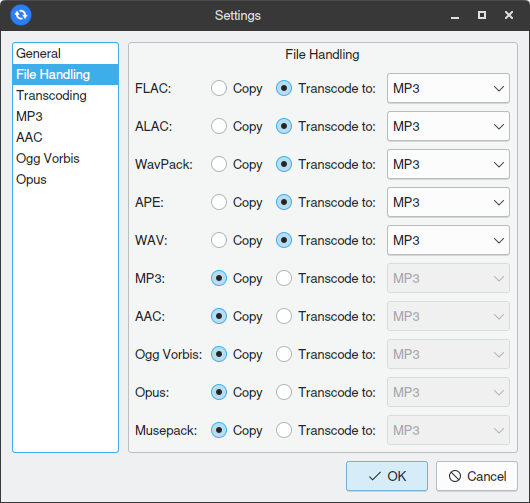
Easy Audio Sync is an audio library syncing and conversion utility. The intended use is syncing an audio library with many lossless files to a mobile device with limited storage.

The program’s design is inspired by the rsync utility. It supports folder-based source to destination syncing, with added audio transcoding capability, and is GUI-based instead of CLI-based.

Features:

  • Custom FFmpeg-based audio transcoding engine
    • Multithreaded operation for fast conversions
    • 4 lossy output codecs supported: MP3, AAC, Ogg Vorbis, and Opus
  • Robust metadata parser ensures tags and cover art are correctly transferred when converting between different formats
  • ReplayGain volume adjustments
  • Destination folder cleaning (deleting files that no longer exist in the source)
  • Cross-platform Windows/macOS/Linux

github.com/complexlogic/EasyAudioSync

AudioAlign ~ Audio Synchronization & Analysis Tool


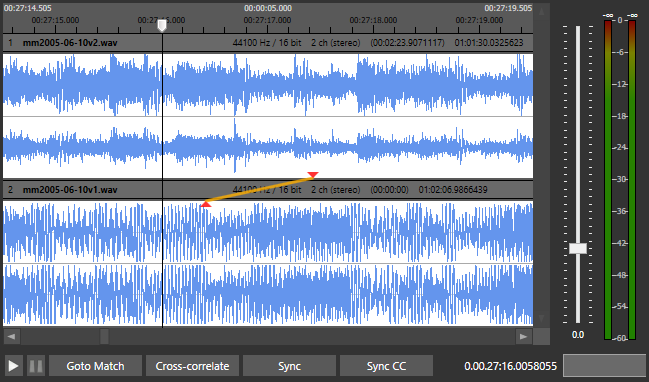
AudioAlign is a research tool to investigate automatic synchronization of audio and video recordings that have either been recorded in parallel at the same event or contain the same aural information. It is designed as a GUI for the Aurio library.

github.com/protyposis/AudioAlign

FoobarSync ~ Syncronize Your Media


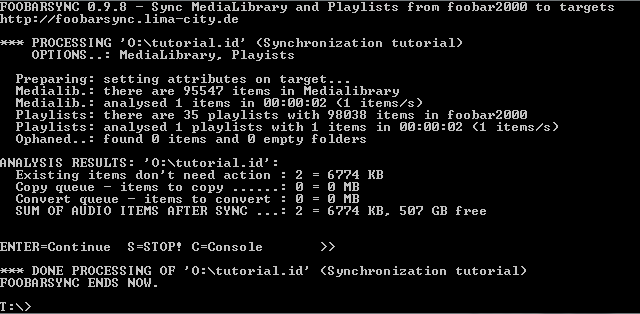
FoobarSync is an command line driven VBscript which will synchonize parts from your foobar2000 Medialibrary and Playlists to one or more targets in a very flexible way.

Lets say you have a USB-Stick for your car entertainment system plus an Android device. Sure you want to have some music in your car and on your Android. But your car only accepts MP3 and needs a special folder-layout while your Android device plays many formats, but you want to save space and therefore want lower bitrates. And at least you want to have different albums and playlists in your car then on your Android. FoobarSync will help you to meet those demands plus more.

FoobarSync will get a subset of items from your Medialibrary AND your playlists, defined by a search-query and other rules. The selected items can be defined per target (one configuration file per target). This configuration file is stored in the root folder of the target. When synchronizing each item is checked against the defined rule sets and then a) copied to the target or b) converted to the target. If your subset (choosen items) in foobar2000 changes, these changes will get synchonized as soon as you rerun FoobarSync.

foobarsync.lima-city.de/wikka/HomePage
hydrogenaud.io/index.php?topic=108834.0