
My Music Habits analyzes music listening trends for Last.fm members and provides insight on the diversity of music being listened to.
The music listening trends are broken down into artist/album/track trends and can be viewed over a variety of time periods.
www.mymusichabits.com
Tag Archives: collection

Tagscanner ~ Tag Editor & Utility
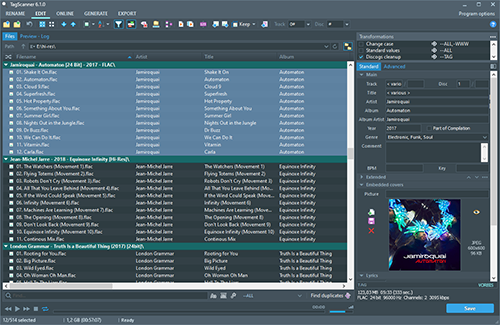
TagScanner is a powerful tool for organizing and managing your music collection. It can edit tags of most modern audio formats, supports ID3v1/v2, Vorbis comments, APEv2, WMA and MP4(iTunes) tags. You can rename files according to information from the tags, import tag information from filenames or other sources, perform any text replacement and transformations in tags and filenames. Also you may get album info and download covers via online databases like freedb, Discogs or MusicBrainz. You can create playlists in one click and export your collection to HTML, Excel or any user-defined format. Program has easy-to-use multilingual interface and built-in audio player.
Features:
- Rename files based on the tag and file information
- Powerful multiple files tag editor
- Import album information and covers from online databases like Discogs or MusicBrainz
- Generate tag information from file/foldernames
- Tag fields formatting and rearrangement
- Words replacement and case conversion from tags and filenames
- Supports MP3, OGG, FLAC, WMA, MPEG-4, Opus, Musepack, Monkey’s Audio, AAC, OptimFROG, SPEEX, WavPack, TrueAudio, WAV, AIFF, Direct Stream Digital files
- Supports ID3 1.0/1.1/2.2/2.3/2.4 tags, APE v1 and v2 tags, Vorbis Comments, WMA tags and MP4(iTunes) metadata
- Supports for embedded lyrics and cover art
- Resize cover art for portable devices on the fly
- TAGs versions conversions
- Quick playlists creation
- Export information to HTML, XML CSV or any user-defined format
- Full support for Unicode
- Multi-language interface
- Built-in audio player
Share this:

Similarity ~ Refines Music Collections
As an active music fan you surely know how difficult it sometimes may be to keep your music collection ordered. The more sound files you have, the more time and effort it takes to clean out duplicates, low-quality files and purify the entire collection of any musical garbage it contains. That’s where Similarity comes in handy!
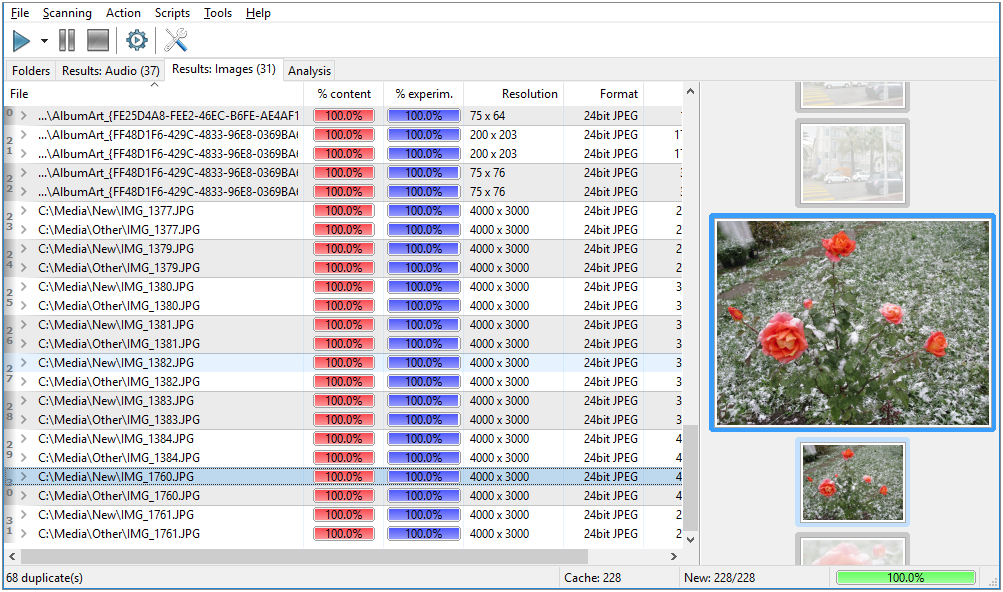
Similarity rapidly scans your music collection and shows all duplicate music files you may have. The comparison, powered by “acoustic fingerprint” technology, considers the actual contents of files, not just tags or filenames, and thus ensures the extreme accuracy of similarity estimation. Moreover, the comparison isn’t audio file format dependent; the application supports almost every file format in full.
Alongside eliminating musical doubles, Similarity also provides advanced quality control functions. Really, who wants a collection full of low-bitrate music, badly remastered compositions and songs full of noise? Similarity analyzes files and calculates a quality score basing on various technical parameters of that recording, such as: bitrate, frequency, amplitude cut value, amplitude average value, amplitude maximum and many others. The program automatically detects all common problems with audio files and assigns a corresponding quality mark to each file. A quick sort – and you’ve got files with the highest quality at the top and files you can delete without doubts at the bottom.

 The Audio File