
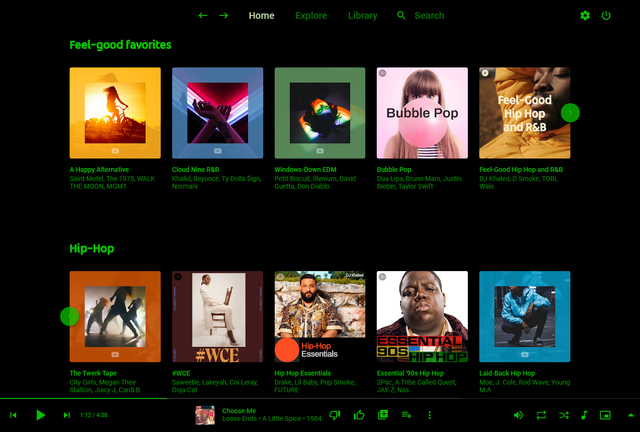
Pear Desktop is an Electron-based desktop client for YouTube Music designed for Windows, Linux and macOS. The project keeps the standard YouTube Music interface while adding desktop integration, plugins, themes and additional playback features.
The application is open source and distributed under the MIT license.
Features:
- Native desktop-style window and controls
- Plugin framework
- Ad blocker
- Lyrics support
- Last.fm scrobbling
- Discord Rich Presence
- Media key support
- Custom themes and CSS
- Audio compressor
- Equalizer
- Crossfade
- Skip silences
- SponsorBlock integration
- Video/audio mode toggle
- Notification support
- Downloader plugin
- OBS integration
- System tray support
- Global keyboard shortcuts
How It Works
Pear Desktop loads the standard YouTube Music web interface inside a desktop application window and extends it through plugins and Electron desktop integration. It is not a standalone music service and still requires a YouTube Music or Google account for normal use.
Basic Usage
- Download the correct installer for your operating system from the Releases page.
- Install and launch the application.
- Sign into your Google account.
- Use YouTube Music normally.
- Optional plugins can be enabled or disabled from the Plugins menu.
Platforms
- Windows
- Linux
- macOS
Notes
Because Pear Desktop uses Electron, memory and CPU usage are generally higher than lightweight native audio players such as foobar2000 or AIMP. The project is intended primarily as a feature-enhanced desktop frontend for streaming music from YouTube Music rather than as a traditional local-library music player.
github.com/pear-devs/pear-desktop


