Tascam Podcast Editor ~ Simple Audio Editor For Podcast Creation


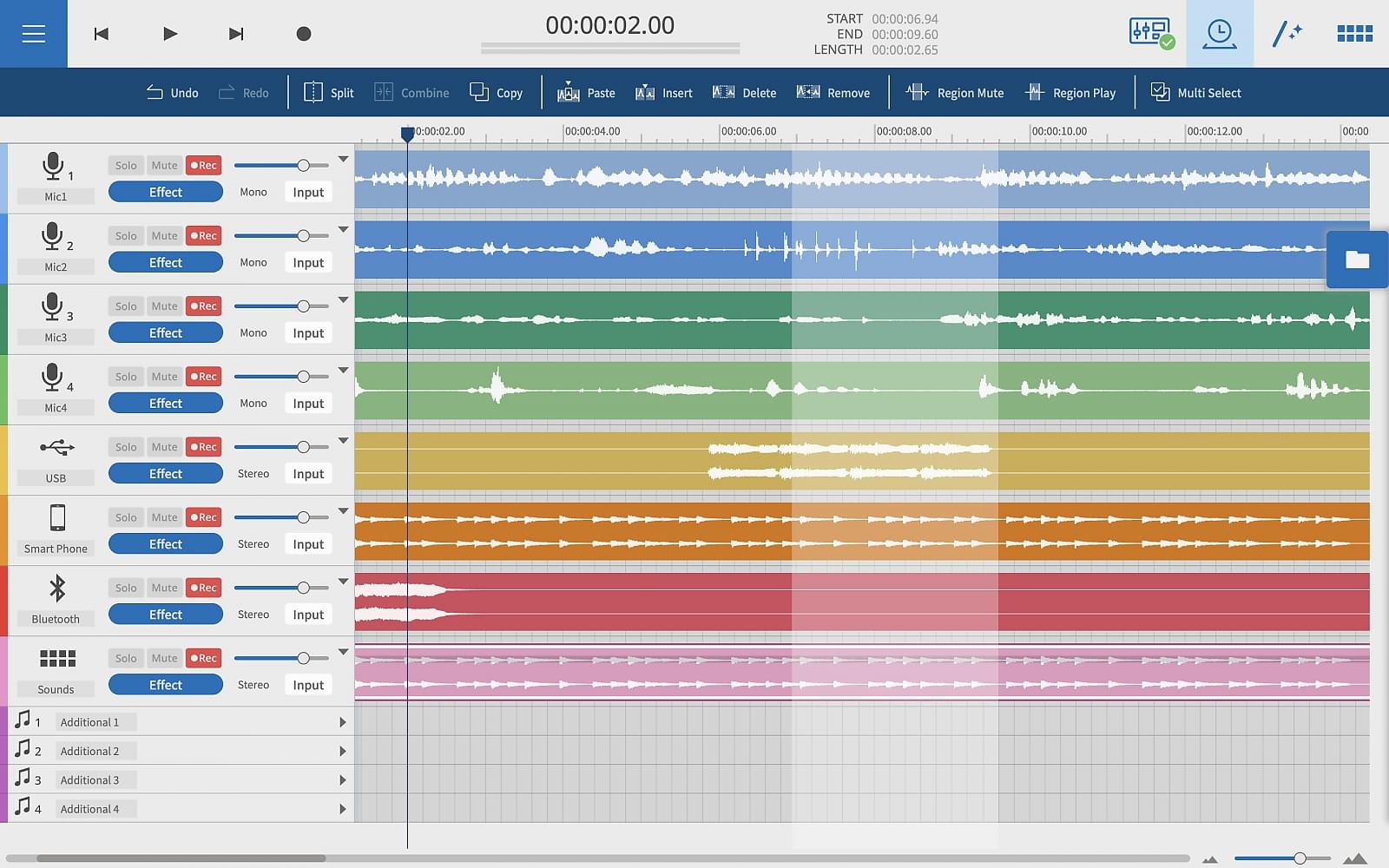
Tascam Podcast Editor is a software application specialising in the production of voice content such as podcasts, Internet radio, audio books, and voice logs.

From recording to editing and file output, the Tascam Podcast Editor provides all the functions necessary to publish a programme with intuitive, easy operation.

Tascam Podcast Editor | Simple Audio Editor for Podcast Creation

www.tascam.eu/en/podcast_editor

You can download the Tascam Podcast Editor free of charge from the Tascam website after registering a Tascam ID.

HALAC ~ High Availability Lossless Audio Compression


HALAC focuses on a reasonable compression ratio and high processing speed. The compression rate for audio data is usually limited. So I wanted a solution that can work faster with a few percent concessions.

github.com/Hakan-Abbas/HALAC-High-Availability-Lossless-Audio-Compression
github.com/Hakan-Abbas/HALAC-Audio-Player
hydrogenaudio.org/index.php/topic,125248.0

Foobar2000 ~ Displaying Song Tags


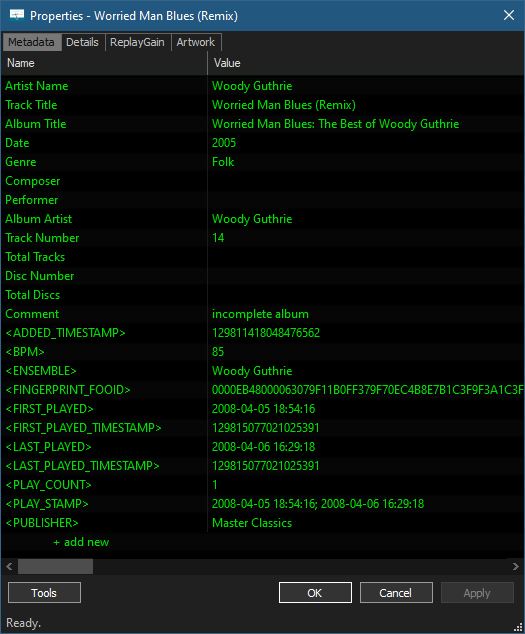
Properties dialog (most direct)

This is the canonical metadata view.

How

  • Right-click a track or selected tracks
  • Choose Properties
  • Or press Alt + Enter

What you see

  • All embedded tag fields (ARTIST, ALBUM, DATE, GENRE, etc.)
  • Technical metadata (codec, bitrate, sample rate, channels, etc.)
  • ReplayGain info
  • File location and size
  • Embedded Artwork

Notes:

  • For multiple files, differing values are shown as <multiple values>
  • This is the same dialog used for editing tags

foo_masstagger ~ Automate Foobar2000 Tag Editing


Automates various tag editing operations.

www.foobar2000.org/components/view/foo_masstag
wiki.hydrogenaudio.org/…/Masstagger_(foo_masstag)

Usage:

Adding MOOD tags:

  1. Select tracks
  2. Right-click → Tagging → Manage Scripts
  3. Create a script:
    • Add value
    • Field: MOOD
    • Value: Calm
  4. Save as preset (Mood: Calm)

Repeat once per mood.

After that:

  1. Select tracks
  2. Right Click > Tagging > Scripts
  3. Apply mood script preset

Picard Barcode Scanner ~ Android App


Picard Barcode Scanner helps you to tag your physical releases with MusicBrainz Picard. It allows you to scan the barcode of e.g. a CD and have the corresponding metadata from MusicBrainz automatically loaded into Picard on your desktop.

This is especially useful if you have your physical music collection already digitalized and want to tag the files using the correct album.

github.com/phw/PicardBarcodeScanner

BloomeeTunes ~ Opensource Ad Free & Multisource Music Player


Bloomee🌸 is my Flutter project, An Open-Source Music app designed to bring you Ad-free tunes from various sources. Dive into a world of limitless music from platforms like YouTube and Jio Savan, with more sources blooming soon! 🌼🎵

Why Bloomee?
🌟 Ad-Free Experience: Say goodbye to interruptions and enjoy uninterrupted musical bliss.

🌍 Multi-Source Player: Access your favorite tracks from diverse platforms, with more sources continually joining our melody garden.

🚀 Flutter-Powered Learning: Bloomee is not just about music; it’s about learning and growing with Flutter and BLoC architecture. Explore the intersection of beautiful design and smooth functionality while mastering the art of app development.

Features:

  • 🎵 Offline Music Experience
  • 🚫 Ad-Free Music
  • 📉 Minimal Data Usage
  • 🎤 Time Synced Lyrics
  • 💾 Space Efficient
  • 🏃 Lightweight App
  • 🎧 Personalized Playlist Creation and Sharing
  • 🔓 Open Source
  • ⏲️ Sleep Timer
  • 🌐 Daily Updated Global Charts
  • 🖥️ Support for Windows

sourceforge.net/projects/bloomee
github.com/HemantKArya/BloomeeTunes

waves ~ Terminal Audio Player


Terminal music player with library browser, persistent queue, and MP3/FLAC playback. Built with Go and Bubble Tea.

Features:

  • Library Browser: Browse music by Artist > Album > Track hierarchy
  • File Browser: Navigate filesystem to find music files
  • Playlists: Create, organize, and manage playlists with folder hierarchy
  • Playing Queue: Persistent queue with multi-selection and reordering
  • Audio Playback: MP3 and FLAC support with seeking
  • Trigram Search: Fast fuzzy search across library, files, and playlists
  • Mouse Support: Click to navigate, select tracks, and control playback
  • State Persistence: Queue and navigation saved between sessions

github.com/llehouerou/waves

FerricTDS mkIII ~  Tape Dynamics Simulator


noban.stream ~ Rights-free Music For Streamers


NoBan Stream is a music streaming service that offers free copyright free songs for streamers and content creators alike! Improve your streams and create engaging content without the fear of getting hit by a DMCA strike.

Available on all major music platforms!

noban.stream
noban.stream/streaming-blog

Reverbed ~ Slow & Reverb Music For YouTube


This project focuses on transforming music tracks by applying reverb and slowing them down for YouTube uploads. With the increasing popularity of slowed and reverbed music, this tool is designed to help you create unique audio experiences.

Features:

  • Audio Processing: Apply reverb effects to your tracks.
  • Slowed Music: Slow down any song to create a relaxing vibe.
  • YouTube Uploads: Easily prepare your tracks for YouTube.
  • Integration with MoviePy: Utilize MoviePy for audio and video processing.
  • Customizable Pedalboard: Adjust settings to suit your audio preferences.
  • Easy to Use: Simple commands for fast processing.

github.com/MossEve/reverbed

swp ~ Simple Webstream Player


Simple Webstream Player, to listen and record web radios and other streams.

Features:

  • Simple Webstream Player, to listen to and record web radio and other web streams in mp3, aac and opus format.
  • Auto select the type of audio format.
  • Change live the tempo and pitch.
  • Show ICY tag, including image.
  • Record in wav format.
  • Can also play webstreams from https.
  • Import/Export m3u list of web radio files.
  • You may choose what audio device to use.

sourceforge.net/projects/simplewebplayer

foo_vis_goom ~ What a GOOM! Visualisation


foo_vis_goom is a port for foobar2000 of the “What a GOOM!” music visualizer. It renders the library-provided pixels using OpenGL 4.6.

GOOM in an “incredible trippy visualization plugin!!”

Features:

  • Uses OpenGL 4.6 for rendering.
  • The Goom-2k4 library has been extensively cleaned up.
  • Compatible with the Default User Interface (Default UI) and the Columns User Interface (Columns UI).
  • Tested on foobar2000 v2.25.3 (x86 32-bit and x86 64-bit) and Microsoft Windows 11 (Build 26200).

www.foobar2000.org/components/view/foo_vis_goom