
Convert an album from a single media file with a .cue file to individual tracks instead.
Option 1: foobar2000 (easy, very reliable)
If you already use foobar2000, this is usually the best choice.
Steps
- Open foobar2000
- Drag either the
.cuefile or the.flacfile into foobar- If the CUE is correct, you’ll see the album broken into tracks.
- Select all the tracks
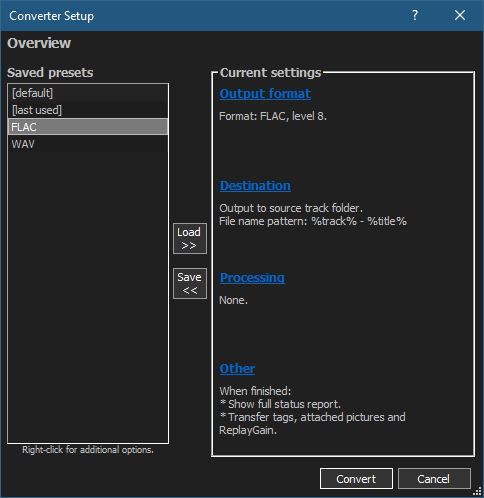
- Right-click → Convert → …
- Choose:
- Output format: FLAC
- Processing: none needed
- Click Destination
- Output path: your album folder
- File name pattern (example):
%tracknumber% - %title%
- Convert
Result
- Individual FLAC tracks
- No quality loss (bit-perfect split)
- Metadata pulled from the CUE
💡 Note: If the cue has gaps or pre-emphasis flags, foobar2000 handles them correctly.
Option 2: CUETools (best for archival accuracy)
If you care about log verification, AccurateRip, or preserving exact offsets, this is the gold standard.
Steps
- Download CUETools
- Open it and load the
.cuefile - Set:
- Action: Encode
- Audio Output: FLAC
- Mode: Tracks
- Start
Result
- Sample-accurate track splits
- Excellent for archival rips
- Strong metadata handling
This is especially good if the album originated from a CD rip.
Option 3: FLAC + shntool (command line, Linux-friendly)
If you’re on Linux, shntool works well.
Example
shnsplit -f album.cue -o flac album.flacThen tag the files:
cuetag album.cue *.flacResult
- Clean, lossless splits
- Metadata from CUE applied
- More manual, but very transparent
Option 4: MusicBrainz Picard (semi-automatic)
Useful if:
- The CUE has weak or missing metadata
- You want MusicBrainz tags
Workflow:
- Load the CUE
- Let Picard identify the release
- Use Tools → Split files
Not as precise as foobar or CUETools for offsets, but fine for most albums.

 The Audio File