
CD-Text is an extension of the audio CD standard that allows you to store additional information on an audio CD, such as album name, album artist and track info. Many audio players like Winamp and RealPlayer can read CD-Text but Windows Media Player has never supported it. Until now, because the WMPCDText plug-in allows Windows Media Player to read CD-Text.
WMPCDText provides an option to automatically read CD-Text from unrecognized audio CDs. Alternatively, you can right-click on a CD track in Windows Media Player’s Now Playing mode while a CD is playing, and select Read CD-Text.
WMPCDText especially comes in handy when using Windows Media Player for playing home-made audio CDs. Before WMPCDText, you would have to insert all the track information of such a CD manually into Windows Media Player. Now, just make sure that the CD-Text information is burned onto the CD, play the burned CD with Windows Media Player, and WMPCDText will automatically read the track information from the CD itself and insert it into the Media Library.
bmproductions.fixnum.org/moreprogs/wmpcdtext
Tag Archives: cd-text

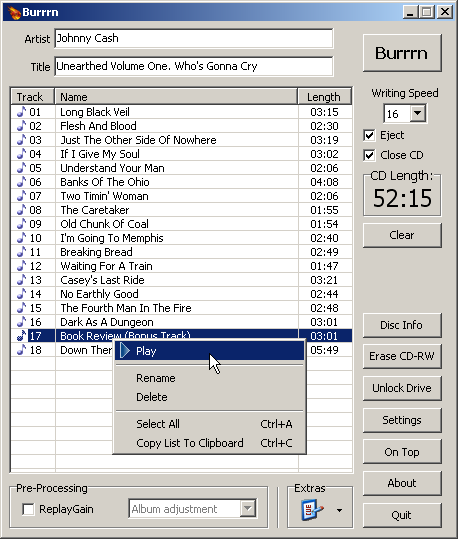
Burrrn ~ Burn Audio CDs The Easy Way!
Burrrn is a little tool for creating audio CDs with CD-Text from various audio files. Supported formats are: wav, mp3, mpc, ogg, aac, mp4, ape, flac, ofr, wv, tta, m3u, pls and fpl playlists and cue sheets. You can also burn EAC’s noncompliant image + cue sheets! Burrrn can read all types of tags from all these formats (including ape tags in mp3). Burrrn uses cdrdao.exe for burning.
www.burrrn.net

 The Audio File