
Tabs are a row of individual containers selectable by a tab at the top of the parent container. Tabs are used to display a number of different panels in the same area.
Adding and Customizing Tabs in Foobar2000 DUI
- Open the View menu in the top menu bar.
- Select Layout > Enable Layout Editing Mode.
- Add a Splitter if necessary
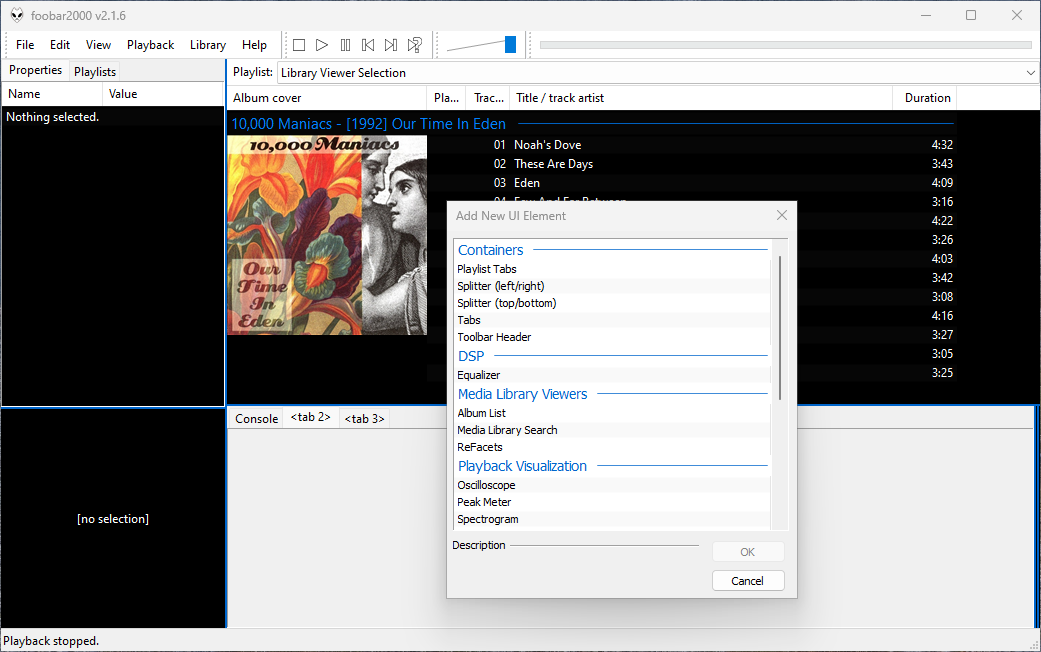
- Right-click the area where you want to insert tabs.
- Select Add New UI Element from the context menu.
- Choose Tabs from the list of available elements and click ok.
- Right-click the newly created top tab row and select Add Tab to create a new tab or name the tabs.
Add Content to Tabs:
Inside each tab, right-click and select Add New UI Element to insert components such as the Console, Equalizer, or Visualizations, etc.
Finalize Your Layout:
After configuring the tabs and naming them, return to the View menu and deselect Enable Layout Editing Mode.
Tip: The mouse wheel switches tabs when hovering over the tab row.
References:
wiki.hydrogenaud.io/index.php?title=Foobar2000:Uie_tabs
wiki.hydrogenaud.io/index.php?title=Foobar2000:Components/Tabs_(foo_uie_tabs)

 The Audio File