
Foobar2000 plays most audio files but can be extended. There is an official Encoder Pack which is a good place to start.
www.foobar2000.org/encoderpack
After downloading the latest version of the encoder pack, launch the installer and confirm it’s found the correct foobar2000 installation.

The next step is to deselect any encoders you don’t need.
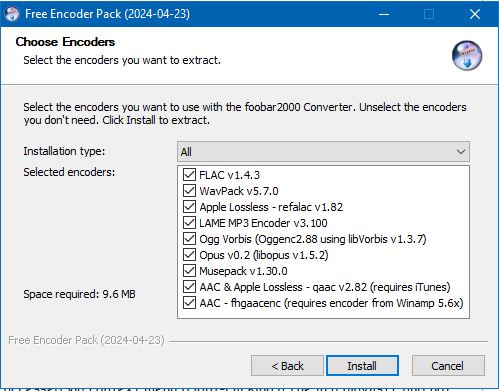
And then click Install
Installing Additional Encoders
You may also need to install additional encoders; these are installed as components. For instance, foo_midi.fb2k allows foobar to play midi files. The component’s download page is here:
www.foobar2000.org/components/view/foo_midi
After you’ve downloaded the component, double click it and foobar should start the component installation procedure.

Click Yes and foobar will install foo_midi and require a restart. Once this is done, you should confirm that foo_midi was installed.
References:
Encoder & Input List
www.foobar2000.org/components/tag/decoder
www.foobar2000.org/encoderpack
wiki.hydrogenaud.io/index.php?title=Foobar2000:Free_Encoder_Pack
wiki.hydrogenaud.io/index.php?title=Foobar2000:Converter
www.foobar2000.org/components/view/foo_midi

 The Audio File