
One of the reasons for Foobar2000’s versatility is extensibility. Its capabilities can be greatly extended by adding components.
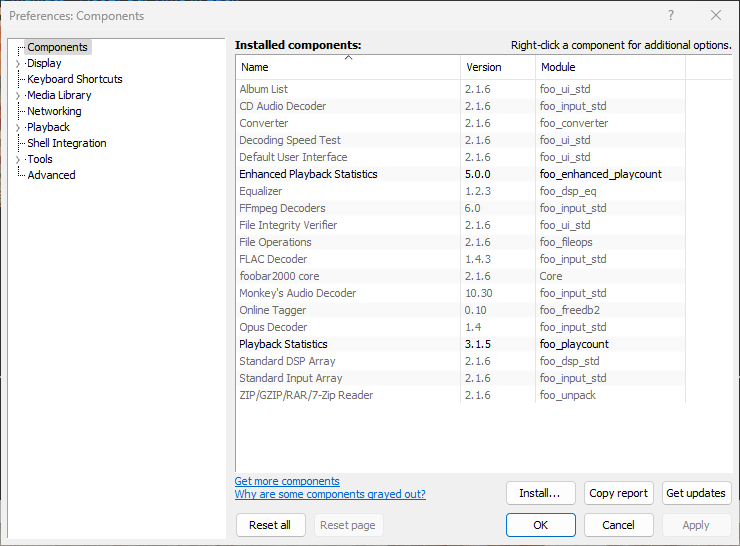
For example, it’s good to keep track of information right from the start. An important first addition is playback statistics which are generated and maintained by foo_playcount.fb2k-component. Also consider installing foo_enhanced_playcount.
To add Playback Statistics to foobar2000, follow these steps:
- Download The New Component:
- Visit the Playback Statistics Component page at www.foobar2000.org/components/view/foo_playcountfoobar2000foobar2000.
- Click the “Download” button to save a local copy of playcount
.fb2k-component.
- Install The Component:
- Go to File > Preferences, or press
Ctrl + P. - In Preferences, go to Installed components on the left-hand side.
- Click the Install button at the bottom of the section.
- Navigate to and select the
foo_playcount.fb2k-componentfile, then click Open and then Apply. - After installation is complete, foobar2000 will prompt you to restart.
- Go to File > Preferences, or press
- Verify Installation:
- Once foobar2000 restarts, you should check File > Preferences > Components to confirm the component is now installed and active.
It’s also possible to install a Foobar2000 component by either dragging and then dropping a component on the component pane or double clicking a component if the file association is working.
The Get Updates button will download and update all the installed components but not Fobar2000 itself, that must be done via the Help Menu. It’s good to update the components occasionally.
The Copy Report button copies a list of installed components to the clipboard.
If the component has a visual element, you’ll also need to add the component to the DUI (Default User Interface) now. Toggle View\Layout\Enable Layout Editing Mode and then add a new panel or tab. Right click the new panel or tab area and select “Add New UI Element …“, then select the new component from the list. You may need to adjust borders to fit, then Exit layout mode.
The Playback Statistics Component keeps track of the following data:
- Time/date first played
- Time/date last played
- Playback count
- Time/date added to the Media Library
- Rating
The Playback Statistics Component also allows playback statistics to be backed up or easily transferred to other Foobar2000 instances.
‘You can export playback statistics to an XML file and import them later, through Library => Playback Statistics menu commands, or through context menu on specific tracks. This can be used to easily transfer playback statistics between different foobar2000 installations or profiles.’ ~ XML Backup Functionality
foobar2000 version 1.6 required for compatibility with this component
References:
www.foobar2000.org/components/view/foo_playcount
wiki.hydrogenaud.io/…/Playback_Statistics_v3.x_(foo_playcount)
foo_enhanced_playcount ~ Enhanced Playback Statistics
foobar2000 ~ Adding Panels To The DUI

 The Audio File
Pingback: Adding Songs To Foobar2000’s Media Library | The Audio File